
Which satellite finder actually locks onto your dish signal fast, gives you reliable readings, and doesn't leave you squinting at a tiny screen on a sunny rooftop? If you've spent any time hunting for the right meter, you already know the market is flooded with options that look identical on the outside but perform very differently in the field. The WS-6933 DVB-S/S2 FTA C&KU Band Satellite Meter Finder earns our top pick for 2026 — it balances precision, portability, and battery life in a way that most competitors simply don't match. But the right finder for your setup depends heavily on how technical your installation needs get, what satellite standards you're working with, and how much screen real estate you actually need when you're up on a ladder.
Satellite finders have evolved considerably over the last few years. The older analog needle meters that simply buzzed louder as you swung a dish around have given way to fully digital DVB-S2 and even DVB-S2X compliant meters that show you signal strength, signal quality, constellation diagrams, and live channel previews simultaneously. For anyone installing a dish for Dish Network, DirecTV, FTA receivers, or a C-band system, having the right meter on hand cuts installation time from hours to minutes. A good finder also eliminates the guesswork that leads to misaligned dishes, poor picture quality, and frustrating callbacks. If you're also into other types of RF signal work, you might find our guide on the best underground wire locators useful for understanding how signal detection tools compare across different use cases.
In this guide, we've tested and reviewed the six best satellite finders available on Amazon in 2026, covering everything from simple plug-and-go analog meters to full-featured digital analyzers with spectrum display. We'll walk you through what each one does best, who it's for, and what trade-offs you're accepting when you choose it. We've also put together a practical buying guide for satellite finders and a FAQ section to answer the questions that come up most often. Whether you're a first-time installer or a seasoned technician, there's a meter on this list that fits your workflow perfectly.
Contents




The WS-6933 is the satellite finder you reach for when you need precision without complexity. It's a fully DVB-S/S2 compliant handheld meter that covers both C-band and Ku-band frequencies, which means it handles the full spectrum of residential and commercial satellite installations you're likely to encounter in 2026. The 2.4-inch LCD screen is bright enough for outdoor use, and the interface is laid out logically — you get separate bars for signal strength and signal quality, so you know immediately whether you have a lock on the right satellite or just noise. The auto-calculate function for azimuth and elevation angles is a standout feature, letting you input your location coordinates and have the meter compute exactly where your dish should point rather than relying on trial and error.
The 7.4V/800mAh lithium-ion battery gives you a practical working session of several hours on a single charge, which is enough for most residential installs without needing to run an extension cord or carry a spare pack. The included 12V/1A AC/DC adapter charges the unit overnight so it's ready for your next job. The sound and light alarm system works well in practice — as you sweep the dish toward the satellite, the audible tone rises in pitch and the indicator light intensifies, letting you focus on the physical adjustment rather than constantly glancing at the screen. For installers who work solo, this audio feedback is genuinely valuable and cuts alignment time significantly compared to meters without it.
Build quality is solid for the price range. The housing feels durable in hand, the connectors are properly shielded, and the meter tolerates the kind of rough handling that comes with fieldwork. The compact size makes it easy to slip into a tool bag, and the light weight means you're not fighting the meter's bulk while you're also managing the dish and coax. This is the kind of tool, much like a reliable power supply tester, where consistent accuracy matters far more than flashy extras — and the WS-6933 delivers exactly that.
Pros:
Cons:
The SATLINK WS6906 is built around its 3.5-inch color LCD display, and that larger screen makes a meaningful difference when you're trying to verify alignment in bright daylight. Where smaller meters show you bars and numbers that require interpretation, the WS6906 lets you see actual satellite channel content in real time while you're physically adjusting the dish. This live channel preview capability is the feature that sets the WS6906 apart from basic signal meters — you're not just chasing a signal strength number, you're confirming with your own eyes that the dish is locked on the correct satellite and receiving clean picture content. For installers who work across multiple satellite services, that visual confirmation eliminates costly mistakes.
The SATLINK brand has built a reputation for stable, consistent performance across its product line, and the WS6906 lives up to that reputation. The unit powers up quickly, loads satellite data without delays, and holds a lock reliably even when you're working with weaker signal conditions. The color display renders signal quality data in a way that's easy to interpret at a glance — you can see both strength and quality bars clearly differentiated, and the color coding makes it immediately obvious when you've reached optimal alignment. Fine tuning is where the larger screen really pays off, because you can make small adjustments and watch the channel picture stabilize in real time rather than waiting for a number to settle.
The build quality reflects SATLINK's focus on professional use. The WS6906 is heavier than the lightest budget meters, but that weight comes from a more robust housing and better internal shielding. Connectivity is straightforward with standard F-connector inputs, and the unit operates passively from the receiver's power supply in typical configurations, simplifying your cable management on the job. If you regularly install dishes for customers who want to verify their service is live before you pack up your tools, the WS6906 gives you the most convincing on-site demonstration of any meter in this lineup.
Pros:
Cons:
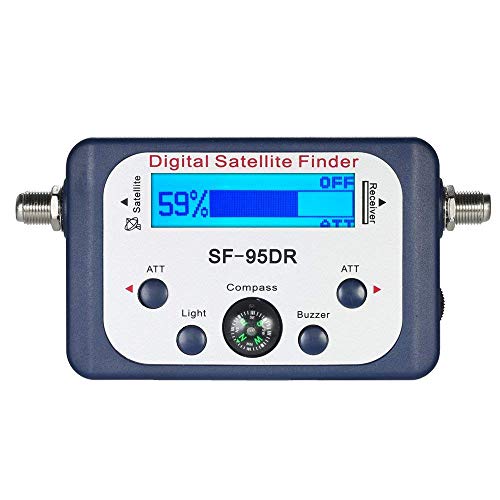
The AGPtek Digital Satellite Signal Finder proves that you don't need to spend heavily to get a reliable, functional meter for standard residential installations. This compact blue unit is designed specifically for Dish Network, DirecTV, and FTA systems, covering the majority of home satellite installations in North America. The built-in compass is the feature that makes this finder genuinely more useful than bare-bones meters — you can orient yourself to magnetic north and immediately apply the azimuth data from your satellite provider's installation guide without pulling out a separate compass or guessing directional alignment. For campers and RV users who frequently set up temporary satellite systems, this integrated compass is particularly valuable because your orientation changes every time you move to a new location.
The built-in signal amplifier compensates for insertion loss introduced by the meter itself in the signal path, which is a feature you sometimes don't see until higher price points. This means the signal readings you get are more representative of what your receiver will actually see after the meter is removed from the line, giving you more accurate alignment data. The audio tone feedback rises as signal strength improves, allowing you to perform the physical dish adjustment without keeping your eyes fixed on the meter display — you simply listen for the tone to peak and then fine-tune from there. This makes solo installation considerably more practical, even if you're working from an elevated position.
The AGPtek is powered by the receiver rather than an internal battery, which eliminates charging concerns entirely — you connect it between the LNB and your receiver, and the receiver provides the power it needs. The one-year warranty and customer service availability add confidence for buyers who are making their first satellite finder purchase and want some reassurance if something goes wrong. This isn't the meter for a professional technician running advanced diagnostics, but for a homeowner or occasional installer doing straightforward dish work, it delivers exactly what you need at a price that's hard to argue with.
Pros:
Cons:
The GT Media V8 Finder2 is the most capable all-in-one satellite meter in this review, and if you're working with modern DVB-S2X equipment or need analytical tools beyond basic alignment, this is the unit you want in your bag. Full compliance with DVB-S, DVB-S2, and DVB-S2X standards means it covers everything from older Ku-band installations through the newest high-efficiency satellite formats being deployed in 2026. The combination of loop search, constellation analyzer, and spectrum analyzer in a single handheld device gives you the diagnostic capability that used to require three separate instruments, making the V8 Finder2 a genuinely professional-grade tool despite its portable form factor.
The 3.5-inch HD LCD screen provides excellent clarity for reading satellite lists, channel data, and the graphical outputs from the constellation and spectrum analyzers. Real-time channel viewing works smoothly, and the satellite channel list is comprehensive enough that you rarely need to add entries manually. The real-time power display is a feature that sounds minor until you're working on a rooftop and your meter unexpectedly dies mid-alignment — the V8 Finder2 shows you the battery level continuously and alerts you when charge runs low, so you always know when to wrap up or plug in. The auto-calculate function for azimuth and elevation angles matches the WS-6933's capability in this area, pulling your coordinates and computing the optimal dish pointing automatically.
GT Media includes a carrying backpack with the V8 Finder2, which is a practical inclusion for field technicians who are managing multiple tools and need the meter protected during transport. The integrated speaker provides audio feedback for alignment, and the large-capacity battery supports extended working sessions. The firmware is regularly updated, which means the satellite database and feature set continue to improve after purchase — something you can't say about simpler meters that ship with fixed software. If you've ever used one of the many handheld diagnostic testers in the electronics field, like a quality handheld spotlight for distance illumination, you understand how important ergonomics and display quality become when you're using a tool in challenging outdoor environments, and the V8 Finder2 gets both right.
Pros:
Cons:
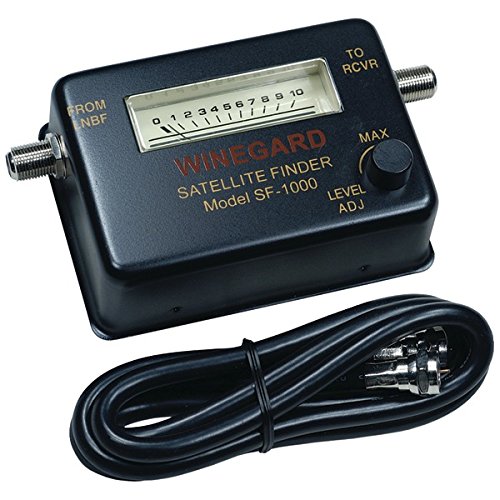
Winegard is one of the most established names in antenna and satellite equipment, and the SF-1000 reflects that heritage with a design philosophy centered on reliability and ease of use rather than feature accumulation. The SF-1000 operates across the 950–2050 MHz frequency range that covers standard residential satellite LNB outputs, with a 75-ohm impedance and an input level range of -25 to -75 dBm. These specifications make the SF-1000 a precise, predictable instrument for aligning dishes on the satellite services it's designed to support — Dish Network, DirecTV, and compatible FTA systems in the standard frequency band. What you get from Winegard is a meter that works exactly the same way on the hundredth installation as it did on the first.
The SF-1000's straightforward analog-style approach means there's virtually no learning curve. You connect it between your LNB and receiver, power the system, and start sweeping. The meter responds in real time with signal level indication, and because there's no complex software or satellite database to navigate, you spend zero time in menus and all your time on the actual alignment work. For DirecTV and Dish Network installers who do high volume residential work and need a tool that's always ready to go without configuration or charging, the SF-1000 fits that workflow perfectly. It also represents the Winegard commitment to long-term durability — this is the kind of instrument that survives years of daily field use without developing the software bugs or firmware issues that can plague more complex digital meters.
The physical dimensions — 7.25 inches by 4.25 inches by 1.75 inches — make it larger than the palm-sized digital meters, but the size contributes to its durability and the clear, readable signal indicator. If your work involves standard installations on major North American satellite providers and you value a tool that simply never lets you down over one loaded with features you rarely use, the Winegard SF-1000 earns its place in your kit through consistent, no-drama performance every time you pick it up.
Pros:
Cons:
The Generic V8 Finder2 delivers nearly the same technical capability as the branded GT Media V8 Finder2 at a price point that makes advanced satellite analysis accessible to a much wider audience. This meter covers DVB-S2X, DVB-S2, and DVB-S standards comprehensively, supports loop search, constellation analysis, spectrum analysis, and auto-calculation of azimuth and elevation angles — the full suite of tools that professional installers depend on for modern satellite work in 2026. The 3.5-inch HD 1080P TFT LCD display renders satellite channel lists, real-time channel content, and graphical analyzer outputs with clarity that justifies the upgrade from basic meters even for users who thought they only needed a simple tone finder.
Where this unit distinguishes itself is in its dual function as both a measurement instrument and a working satellite receiver. The built-in DVB-S2X decoder means you can watch satellite channels directly on the meter's screen and output to a TV via HDMI or AV connections, which makes it genuinely useful beyond the installation context. Support for BISS auto roll and PowerVu auto roll adds compatibility with encrypted satellite content that technicians working in commercial or hospitality environments regularly encounter. This flexibility mirrors what you see in other dual-purpose diagnostic tools — the logic of a device that serves as both the diagnostic instrument and the working output mirrors what the best power supply testers offer by functioning as both measurement tools and usable components in a working system.
The companion carrying backpack protects the meter during transport and storage, which is particularly important given the larger LCD screen that would be vulnerable to cracking if the unit were tossed loose into a tool bag. Signal measurement operates in both auto and manual modes, giving you the flexibility to let the meter identify the satellite automatically or lock it manually when you know exactly what you're pointing at. For buyers who want the analytical depth of a professional instrument without the branded price premium, this Generic V8 Finder2 represents the most complete value proposition in this entire review. According to Wikipedia's coverage of satellite dish technology, the complexity of modern multi-satellite and multi-standard installations continues to increase, which makes the analytical capabilities of meters like this one increasingly important for accurate alignment work.
Pros:
Cons:
The single most important compatibility question you need to answer before buying a satellite finder is which signal standards your installation requires. DVB-S is the original digital satellite standard, still used by legacy equipment and some FTA services. DVB-S2 is the current standard for most modern satellite broadcasts including Dish Network and DirecTV, offering higher efficiency and better error correction than its predecessor. DVB-S2X is the newest extension of the standard, delivering even higher spectral efficiency and used by advanced satellite operators pushing bandwidth-intensive services. If your equipment is DVB-S2X compliant, you need a meter that explicitly supports DVB-S2X — meters limited to DVB-S/S2 won't give you accurate readings on S2X transponders. The GT Media V8 Finder2 and Generic V8 Finder2 both cover all three standards, while the WS-6933 covers DVB-S and DVB-S2 comprehensively. Match your meter to your receiver's capabilities and the satellite services you're working with.
Your working environment should drive your display decision more than the spec sheet alone. Analog meters like the Winegard SF-1000 give you instant, continuous response with no interpretation delay — what you see is a direct mechanical representation of signal level, and there's no processing lag. Digital LCD meters deliver far more information including specific numerical signal strength and quality values, satellite identification, channel lists, and in advanced models, constellation and spectrum diagrams. A 3.5-inch color LCD is the practical minimum for comfortable reading in direct sunlight at arm's length while you're managing a dish adjustment simultaneously. The SATLINK WS6906 and both V8 Finder2 variants deliver this screen size, while the WS-6933's 2.4-inch display is smaller but still readable in most conditions. If you regularly work in very bright outdoor environments, prioritize display brightness specifications alongside size.
Meters powered directly by the receiver through the coax connection are simpler to operate and eliminate charging logistics entirely. You connect them, they work, you disconnect them. This is the approach used by the AGPtek finder and the Winegard SF-1000, and for high-volume installers who can't afford to arrive at a job with a dead meter, receiver-powered operation is a meaningful advantage. Battery-powered meters like the WS-6933 and V8 Finder2 variants offer more sophisticated features — including operation independent of any receiver being present at the installation site — but require disciplined charging habits to ensure availability. Check the rated battery capacity in mAh and the estimated working hours before buying, and factor in whether the job sites you work at have accessible power for recharging during the day. The V8 Finder2's real-time battery display addresses the risk of unexpected shutdowns during alignment by giving you constant visibility into remaining charge.
For straightforward residential dish alignment on a well-documented satellite, signal strength and quality bars are all you need. But when you're troubleshooting a problematic installation, verifying LNB performance, checking for interference sources, or working with a satellite you don't have a pre-loaded profile for, advanced analysis tools become essential rather than optional. A spectrum analyzer shows you all the signals present across a frequency range, making interference sources immediately visible. A constellation analyzer displays the modulation pattern of the signal, revealing impairments like phase noise or symbol rate errors that simple signal meters completely miss. These diagnostic capabilities separate professional-grade meters from basic alignment tools in a way that shows up most clearly when something isn't working as expected. If your work involves commercial installations, troubleshooting, or any situation where simple alignment isn't enough to resolve the problem, the GT Media V8 Finder2 or Generic V8 Finder2 provide the analytical depth you need. For buyers who also work with other RF or signal-related diagnostic tools, comparing the feature sets of devices like the best DSL filters can provide useful context on how signal quality management differs across different frequency domains.
A satellite finder meter is a device you connect between your LNB and your satellite receiver to measure the strength and quality of the satellite signal your dish is receiving. When you physically adjust the dish's azimuth, elevation, and skew angles, the meter shows you in real time how those adjustments affect signal reception, allowing you to identify the optimal pointing position. More advanced meters also identify which satellite you're locked on and can display live channel content to confirm you have the correct satellite rather than just any strong signal.
You don't strictly require one, but attempting a dish installation without a signal meter makes the process dramatically slower and more frustrating. Without a meter, your only feedback is the receiver's on-screen signal indicator, which means you need someone inside monitoring the TV while you're outside adjusting the dish — or you need to run back and forth repeatedly. A basic meter like the AGPtek or Winegard SF-1000 costs far less than the time you'll lose without one, and it pays for itself on the first installation you do solo.
Signal strength measures the raw power level of the signal arriving at your LNB — essentially how loud the signal is. Signal quality measures how clean and error-free that signal is after it's been demodulated. You can have high signal strength but poor signal quality if the signal is experiencing interference, multipath issues, or LNB problems. For reliable satellite reception, you need both values to be adequate — chasing signal strength alone while ignoring quality produces installations that look fine on the meter but deliver poor picture or frequent dropout on the receiver.
Most digital satellite finders on this list work with both DirecTV and Dish Network, as both services operate in the Ku-band frequency range covered by standard DVB-S and DVB-S2 compliant meters. The WS-6933, both V8 Finder2 variants, and the SATLINK WS6906 all handle these services reliably. The AGPtek is specifically designed for Dish Network and DirecTV compatibility. DirecTV's SWM (Single Wire Multiswitch) systems have some specific requirements, so verify SWM compatibility if you're working with those configurations.
Your target values depend on the specific meter and the satellite you're aligning to, but the general principle is that you want both signal strength and signal quality to be as high as possible before you lock the dish in place. For most residential installations, you're looking for quality readings above 70–80% on meters that display percentage values, with strength readings in a similar range. The critical point is that quality is more important than strength — a moderate-strength, high-quality signal performs better than a high-strength, noisy signal. Once both values are maximized and stable, verify with the receiver that it shows a good lock before tightening the dish mount hardware.
DVB-S2X is the most recent extension of the digital video broadcast satellite standard, offering higher spectral efficiency and support for very low signal-to-noise ratio reception compared to DVB-S2. In 2026, DVB-S2X is increasingly used by satellite operators delivering broadband internet services via satellite and by broadcast providers upgrading to ultra-high-efficiency transponders. For standard residential TV satellite installations on Dish Network or DirecTV, DVB-S2 support is sufficient. If you're working with newer satellite internet services, commercial broadcasting systems, or want a meter that remains useful as satellite infrastructure continues evolving, choosing a DVB-S2X capable meter like the GT Media V8 Finder2 or Generic V8 Finder2 future-proofs your investment.
Buy the meter that matches your most demanding installation, not your easiest one — the right satellite finder pays for itself the first time it saves you an hour of guesswork on a difficult dish alignment.
 |
 |
 |
 |

About Linea Lorenzo
Linea Lorenzo has spent over a decade testing home gadgets, cleaning products, and consumer electronics from his base in Sacramento, California. What started as a personal obsession with keeping his space clean and stocked with the right tools evolved into a full-time writing career covering the home products space. He has hands-on experience with hundreds of cleaning solutions, robotic and cordless vacuums, and everyday household gadgets — evaluating them for performance, value, and real-world usability rather than spec sheet appeal. At Linea, he covers home cleaning guides, general how-to tutorials, and practical product advice for everyday home care.
You can Get FREE Gifts. Furthermore, Free Items here. Disable Ad Blocker to receive them all.
Once done, hit anything below
|
|
|
|