
by Linea Lorenzo
Which power supply tester should you buy in 2026 — and does it even matter which one you pick? It absolutely does. A dead PSU mimics dozens of other hardware failures, from random reboots to complete POST failures, and diagnosing it with the wrong tool wastes hours. The Thermaltake Dr. Power III is our top pick for most builders, especially anyone running a modern PCIe 5.0 GPU that demands the new 12+4-pin connector. But the right tester for your bench depends on what you're testing, how often, and how much detail you actually need.
Power supply testers sit alongside other diagnostic tools like an OBD2 gauge display — both exist to surface hidden failures before they turn into expensive disasters. A quality PSU tester gives you real voltage readings across every rail, not just a thumbs-up LED. When your system refuses to boot, that difference between +12V at 11.4V versus 11.9V tells you whether the PSU is failing or just borderline. Without those numbers, you're guessing.
We reviewed the four leading power supply testers available in 2026, covering entry-level buzzer units all the way to full-featured LCD testers with support for the latest ATX12V v3.1 standard. Whether you're a PC technician running diagnostics on dozens of builds per month or a home builder who wants a reliable bench tool, this guide covers exactly what you need to know. Check out our broader tech reviews for more buying guides like this one.


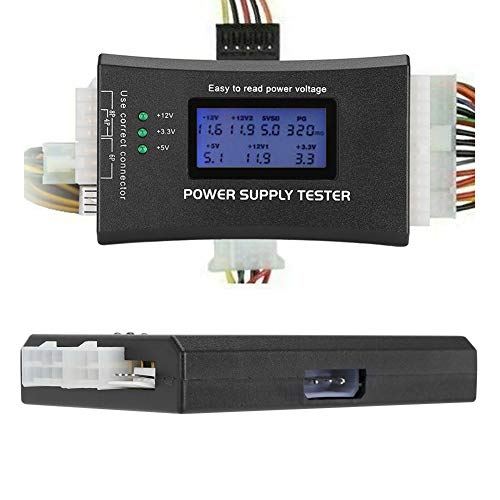


If you're building or servicing a system with a modern high-wattage GPU, the Thermaltake Dr. Power III is the tester you need on your bench. It's the only consumer-grade PSU tester that fully supports ATX12V v3.1, which means it handles the 12+4-pin PCIe connector used by RTX 40-series and RX 7000-series cards. Most older testers simply don't have that connector, leaving you unable to verify the most power-critical part of a contemporary build. Thermaltake closed that gap with this unit, and it's a significant advantage for anyone working on current-generation hardware.
The real-time LCD display shows output voltages across the four primary rails: +12V, +5V, +3.3V, and +5VSB. Readings update continuously while the PSU is under test, so you can watch for voltage droop rather than just catching a single snapshot. The display is clear and well-lit, readable without bending over the bench. Build quality feels professional — the housing is solid plastic with no flex, and the connectors accept standard ATX plugs with a firm, positive click. The unit also detects faults via buzzer alarm, so you don't need to watch the screen every second during a prolonged test.
For professional technicians and serious enthusiasts, this is the definitive ATX tester for 2026. The PCIe 12+4-pin support alone justifies the price premium over budget alternatives. You're not just buying convenience — you're buying the ability to correctly diagnose the connectors that are most likely to cause failures in modern systems. If you work on older hardware exclusively, a cheaper unit will do the job, but for anyone dealing with current-gen builds, the Dr. Power III is the right tool.
Pros:
Cons:
This compact ATX tester handles the basics cleanly and costs a fraction of premium units. The LCD display activates when you connect the 20-pin or 24-pin main ATX connector, showing output voltages clearly without any calibration needed. For the secondary connectors — P4, P6, P8, SATA, and IDE — the tester uses LED indicators rather than voltage readouts. That's a real limitation if you need precise rail data on everything, but for quick pass/fail checks on the primary connector, it works exactly as advertised.
The form factor is notably compact, which matters when your bench is already crowded with components. The buzzer alarm triggers automatically when any detected voltage falls outside the normal range, giving you an audible warning without needing to watch the display. The unit covers ATX, ITX, BTX, PCI-E, SATA, and HDD connectors, so you can test just about every connector on a conventional PSU. It won't handle the new 12+4-pin PCIe connector found on the latest high-end cards, but for any build pre-RTX-40-series, it covers the full range.
For home users who test PSUs once or twice a year, or for anyone building a small toolkit on a budget, this tester delivers solid value. You won't get voltage readings on every single connector, but you'll get a reliable verdict on whether a PSU is worth keeping or trashing. Think of it as the equivalent of a basic wire locator tool — it may not give you full mapping detail, but it tells you quickly whether something is live or dead. That's often all you need.
Pros:
Cons:
This tester distinguishes itself with one of the most complete connector lineups in its price class. It covers 20-pin, 24-pin ATX, SATA, 4-pin, 8-pin, PCI-E 6-pin, floppy drive, and multiple additional interfaces — essentially the full catalog of connectors you'll find across ATX, BTX, ITX, and TFX power supplies from the past fifteen years. For a technician who services a wide mix of hardware, that breadth is genuinely valuable. You won't find yourself reaching for a second tester just to check an older proprietary connector.
The intelligent LCD display shows six key parameters simultaneously: +12V, -12V, +5V, -5V, +3.3V, and SB and PG signals. The negative rail readings matter more than people realize — the -12V rail powers serial port hardware on older boards, and a degraded -12V reading can cause subtle failures that are nearly impossible to diagnose any other way. The built-in fault alarm doesn't just buzz; it also flashes the specific abnormal parameter on the LCD screen, so you know immediately which rail is out of spec rather than having to scan the display manually.
Real-time monitoring is the feature that separates good testers from great ones. This unit lets you watch voltages while the PSU is running, which means you can catch intermittent droop under simulated load conditions. That's the kind of failure that kills a system during a game or a render but looks fine when the machine is idle. The combination of wide connector coverage and real-time fault indication makes this the most versatile mid-range tester on this list. It doesn't support ATX12V v3.1, but for anyone working on hardware from 2015 to 2024, it handles everything you'll encounter.
Pros:
Cons:
The Seasonic Power Angel is a fundamentally different tool from the other three on this list, and understanding that difference is essential before you buy. It doesn't test the PSU in isolation — it measures the power consumption of the entire system while it runs. You plug it between your wall outlet and your PC, and it measures watts, volt-amperes, frequency, power factor, and kilowatt-hours in real time. This makes it the right tool for a completely different set of questions: How much is this PC actually costing me on my electric bill? Is my PSU undersized for my system? Am I hitting the efficiency sweet spot of the PSU's load curve?
Seasonic is one of the most respected names in PC power supplies, and the Power Angel reflects that engineering credibility. The build is dense and solid — this is clearly a professional-grade instrument, not a knockoff. The digital display is clean and readable. Accuracy is rated to within a few percent, which is more than sufficient for system-level power analysis. For a PC technician advising clients on whether their 500W PSU is adequate for a new GPU, or for a home user trying to quantify their PC's electricity consumption, the Power Angel delivers data that no conventional PSU tester can provide.
Where the Power Angel falls short is in PSU fault diagnosis. It can tell you that your system is drawing 320W from the wall, but it cannot tell you whether the +12V rail is running at 11.8V or 12.1V. If your goal is to verify that a PSU's rails are within spec before installing it in a build, you need one of the inline ATX testers above. If your goal is to audit power consumption, verify that a PSU upgrade is justified, or troubleshoot efficiency problems, the Power Angel is the better instrument. Use it alongside an ATX tester, not instead of one.
Pros:
Cons:
Picking the right PSU tester comes down to matching the tool to your actual diagnostic workflow. A home builder has different needs than a repair technician running ten diagnostics a day. Here are the criteria that matter most.
This is the most important factor for anyone building or servicing modern systems in 2026. The ATX standard has evolved significantly, and the introduction of ATX12V v3.1 brought the 12+4-pin PCIe connector for high-TDP graphics cards. If you work on RTX 40-series, RX 7000-series, or any other card drawing more than 300W from the PSU connector, you need a tester that supports this connector. Currently, only the Thermaltake Dr. Power III on this list covers ATX12V v3.1. Every other tester stops at the previous standard.
For older hardware — anything from roughly 2010 through 2023 that doesn't use PCIe 5.0 power — the standard 20/24-pin testers cover every connector you'll encounter. Don't pay for v3.1 support if you exclusively service legacy hardware.
The choice between an LCD display and LED indicators determines how much diagnostic information you actually receive. LED indicators give you pass/fail data — a green LED means that connector is delivering voltage in the acceptable range, a red LED or alarm means it isn't. LCD displays give you actual voltage values: +12.04V, +11.87V, +5.02V. That difference is enormous when you're trying to decide whether a borderline PSU is worth keeping.
A PSU delivering +12V at 11.5V is technically within the ATX tolerance spec (±5% = 11.4V minimum), but it's at the edge of failure and will cause instability under load. An LED tester might show green for that reading. An LCD tester shows you 11.5V, and you know to replace that unit before it causes data loss or hardware damage. For any serious diagnostic work, LCD voltage readout is non-negotiable.
Count the connector types on any tester before you buy. A basic unit might cover only the 20/24-pin main connector and a few peripheral connectors. A comprehensive unit covers the 24-pin ATX, 4-pin and 8-pin CPU connectors, multiple PCI-E variants (6-pin, 8-pin, 12+4-pin), SATA, Molex/IDE, and floppy. The more connector types you need to test regularly, the more you want full coverage on a single unit. Swapping tools mid-diagnosis wastes time and introduces error.
Consider the hardware mix you actually work on. Just as a good work light needs to cover the right spectrum for your workspace, your PSU tester needs to cover the right connectors for your hardware. If you're servicing enterprise workstations with unusual proprietary connectors, check the tester's spec sheet before assuming it has what you need.
The Seasonic Power Angel exists in a different product category from the other three testers. Before buying any PSU diagnostic tool, clarify your actual diagnostic question. There are two distinct questions you might be asking:
The two questions require two different instruments. A technician diagnosing a no-POST condition needs an inline tester. A builder trying to decide between a 750W and 850W PSU upgrade benefits from a power meter that shows actual system draw under load. Ideally you have both on your bench, but if you can only buy one, identify your primary use case first.
A power supply tester is a standalone diagnostic device that connects directly to a PSU's output connectors and measures the voltages on each rail without requiring a full system build. You connect the main ATX connector and other cables to the tester, power on the PSU, and the tester displays voltage readings or pass/fail indicators for each rail. This lets you verify a PSU's output before installing it in a system, or diagnose whether a PSU is responsible for a failing build. Most testers include a buzzer alarm that triggers if any voltage falls outside the ATX-specified tolerance range.
Yes, with an important caveat. An LCD tester can show you whether a PSU's rails are within the ATX tolerance spec (typically ±5% of rated voltage). A rail running at 11.5V on the +12V line is borderline; one at 11.2V is failing. However, PSU testers apply minimal load — far less than a real gaming or rendering workload. A PSU that tests fine under the minimal load of a tester may still sag under full system load. For the most accurate diagnosis, monitor voltages in a running system using your motherboard's built-in voltage reporting alongside tester results.
If you own or service systems with RTX 40-series, RX 7000-series, or any other GPU using the 12+4-pin PCIe connector, then yes. ATX12V v3.1 introduced the 12VHPWR/12+4-pin connector to handle GPU power demands above 300W, and standard testers simply don't have that socket. The Thermaltake Dr. Power III is currently the only consumer-grade tester supporting this connector. If you're working exclusively on pre-2023 hardware, a standard tester is sufficient.
A multimeter can measure PSU voltages accurately, but it requires you to probe each connector individually, identify the correct pins for each rail, and interpret results manually. A PSU tester connects all rails simultaneously and displays or indicates all voltages at once, often in seconds. For technicians testing many PSUs regularly, the speed difference is significant. A multimeter is more versatile across all electrical measurements; a PSU tester is faster and simpler specifically for PSU diagnostics. Most professional benches use both tools, since a calibrated multimeter provides more precise readings when you need to investigate a specific rail in depth.
Yes — that's precisely what inline ATX PSU testers are designed for. You connect the PSU's output cables directly to the tester, and the tester provides the minimal load and short-circuit signal needed to make the PSU start. Most ATX PSUs require the PS_ON signal to be grounded (which normally comes from the motherboard) to power on; the tester provides that signal. This lets you verify a PSU's output completely independently from any other system component, which is the correct way to isolate whether the PSU or another component is responsible for a system failure.
Budget LCD testers typically have voltage accuracy within ±2–5%, which is adequate for pass/fail diagnostics but not for precision measurement. A reading of +12.0V on a budget tester could mean anything from +11.76V to +12.24V in reality. Professional-grade testers and calibrated multimeters offer tighter tolerances, often within ±1% or better. For most home and semi-professional use, budget LCD accuracy is sufficient to identify clearly failing PSUs. If you need precise voltage data — for example, when documenting PSU performance for a review or validating a repair — use a calibrated multimeter to cross-check the tester's readings.
The right power supply tester doesn't just tell you a PSU passed or failed — it shows you exactly how close to the edge your hardware is running, and that's the information that prevents expensive mistakes before they happen.
 |
 |
 |
 |

About Linea Lorenzo
Linea Lorenzo has spent over a decade testing home gadgets, cleaning products, and consumer electronics from his base in Sacramento, California. What started as a personal obsession with keeping his space clean and stocked with the right tools evolved into a full-time writing career covering the home products space. He has hands-on experience with hundreds of cleaning solutions, robotic and cordless vacuums, and everyday household gadgets — evaluating them for performance, value, and real-world usability rather than spec sheet appeal. At Linea, he covers home cleaning guides, general how-to tutorials, and practical product advice for everyday home care.
You can Get FREE Gifts. Furthermore, Free Items here. Disable Ad Blocker to receive them all.
Once done, hit anything below
|
|
|
|