
Distracted driving kills over 3,300 people every year in the United States alone, and glancing down at your dashboard is one of the most common culprits. That's exactly why OBD2 heads-up displays have exploded in popularity — they put your speed, RPM, coolant temp, and fault codes directly in your line of sight, so you never have to take your eyes off the road. If you've been shopping for the best OBD2 gauge display, you're already ahead of the curve when it comes to safer, smarter driving in 2026.
OBD2 HUDs work by plugging into your car's onboard diagnostics port (that little trapezoid-shaped socket usually tucked under your steering column) and reading live data from your engine control unit. Some also layer in GPS for speed verification, which is a handy backup if your car's OBD data runs a few seconds behind. The result is a compact display on your dash or windshield that gives you pilot-grade situational awareness without a single wire running to your instrument cluster. If you're also comparing these to dedicated scan tools, check out our full OBD2 scanner guide for a broader look at what the protocol can do.
We tested and evaluated seven of the most popular units currently available, ranging from budget-friendly plug-and-play pucks to feature-packed screens with 96-PID data readouts and fatigue alerts. Whether you're commuting daily, towing on weekends, or just tired of mysterious check-engine lights, there's a pick on this list that fits your situation perfectly. Here's everything you need to know.
Contents
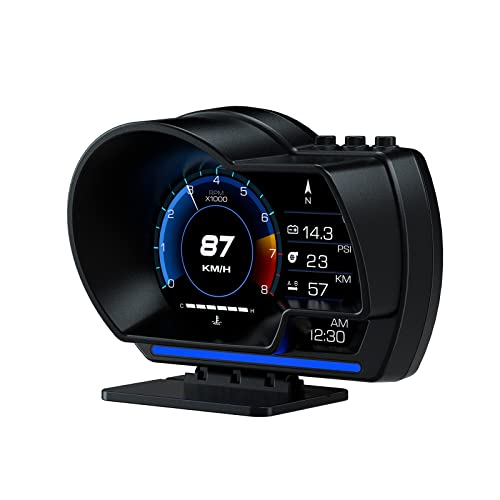


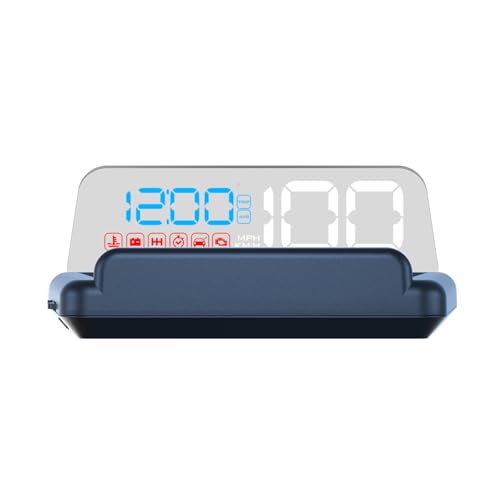


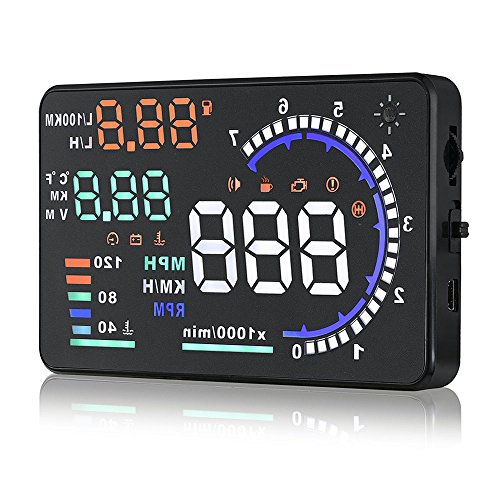
The wiiyii P6 is one of the most well-rounded OBD2 HUDs you can buy right now, and it earns the top spot because it nails the fundamentals without overcomplicating anything. You get 10 switchable display interfaces, so whether you prefer a clean digital speedometer look or a full data-stream screen with RPM and coolant temperature, you're covered. Setup is genuinely plug-and-play — connect the OBD2 cable, choose between dashboard bracket or windshield mount, and you're displaying live data in under five minutes. No app, no Bluetooth pairing, no frustrating firmware update required.
In everyday driving, the P6 proves its value immediately. The LCD panel is crisp enough to read in direct afternoon sunlight, and the overspeed alarm gives you a configurable audio-visual alert before you realize you've crept past your set limit. The fault-code reading feature is a quiet superstar here — most drivers don't realize this thing doubles as a basic OBD2 scanner until they hit that dreaded check-engine light. You can read the code right on the unit and decide whether it's worth an immediate shop visit or just a loose gas cap. The adjustable bracket lets you dial in the exact viewing angle, which matters more than most people anticipate before they actually live with one of these.
The only area where the P6 asks for patience is compatibility on pre-2008 vehicles. It works on most modern cars, but if your daily driver is older, you may see limited data or occasional connection hiccups. That said, for the overwhelming majority of drivers in 2026, this is the one to buy first.
Pros:
Cons:
The HUD M7 brings something genuinely useful to the table: automatic switching between OBD2 and GPS modes. That matters because some cars — particularly hybrids and certain European imports — don't broadcast vehicle speed over the OBD2 port in a readable format. With the M7, you're always covered. In OBD mode, you're pulling speed, water temperature, voltage, and driving distance with dedicated alarms for each. Flip to GPS and you still have speed and voltage on screen with a speed alarm active. The unit automatically adjusts brightness based on ambient light, which sounds minor but makes a real difference when you're driving into a setting sun versus navigating a dim parking garage at night.
Installation on the M7 is honest plug-and-play. The OBD2 connector is the only cable you're dealing with, and the unit powers on with the ignition. The unit supports both km/h and MPH, and temperature units are switchable between Celsius and Fahrenheit — genuinely appreciated for anyone who has swapped cars across markets. The windshield projection is clean on modern laminated glass, and the included reflective film eliminates the ghost-image double projection that plagues cheaper HUDs on non-polarized windshields.
Where the M7 falls short compared to the top-tier picks is depth of data. You're not getting RPM or fuel consumption in GPS mode, and the OBD mode display count, while solid, doesn't match what something like the VJOYCAR V70 offers. But if dual-mode reliability is your top priority — especially for road trips where you might be in areas with weak OBD signal from hybrid systems — the M7 is the intelligent choice.
Pros:
Cons:
If you've ever paid $100 at a shop just to have someone read a check-engine code and tell you it's fine, the C500 pays for itself on the first use. This unit isn't just a display — it's a full OBD2 scanner with real-time fault code reading and clearing, projected directly onto your windshield. Beyond that, the C500 packs a fatigue alert system designed for long-haul drivers: it tracks driving duration and delivers a visual reminder when you've been behind the wheel long enough that drowsiness becomes a real risk. That's not a feature you'll find on most units in this price range.
The safety alert package on the C500 is comprehensive. Overspeed alarms, overheat warnings, and low voltage alerts all fire both visually and audibly, giving you a two-channel warning system that's hard to miss. The gear shift indicator is another standout — it analyzes RPM and speed to suggest optimal shift points, which translates to measurable fuel savings on manual transmission cars. Think of it less as a gadget and more as a co-pilot that speaks engine data. For anyone running a performance build, a modified daily, or doing regular long-distance commutes, the C500's alerting capability is genuinely practical.
The windshield projection quality is good, though you'll want to spend a few minutes setting the reflection angle correctly — the C500 is sensitive to positioning in a way that some other units aren't. Once you dial it in, the display is crisp and stays readable through most light conditions. Just note this unit works best on OBD2-compliant vehicles from 2008 onward for full feature access.
Pros:
Cons:
The VJOYCAR V70 is the data enthusiast's pick. While most HUDs show you four or five parameters, the V70 supports up to 96 PIDs (Parameter IDs) — that's engine load value, intake air temperature, EGR error, fuel rail pressure, odometer, and roughly 90 other readings depending on what your specific car's ECU broadcasts. The 5.8-inch HD LCD screen is the largest on this list, making it easy to read in any lighting condition without squinting. If you're running a modified car or just like knowing exactly what your engine is doing at any given moment, the V70 gives you a level of visibility that would otherwise require a dedicated scan tool mounted on your dash.
Compatibility is a genuine strong point here. The V70 supports all OBD2 protocols including J1850, CAN, and EOBD, which means it works with most vehicles built since 1997 — a full decade earlier than many competitors. That said, VJOYCAR is transparent about the caveats: older vehicles may only show a handful of data points, and some specialized vehicles like buses or modified trucks may not open any data at all. For a standard passenger car or light pickup from 1997 onward, you're in excellent shape. The 0-to-1000 km/h speed-up timer is a niche but genuinely entertaining feature for anyone who likes tracking performance metrics.
The V70's screen flips 180 degrees, so whether you're mounting it dashboard-up or projecting onto your windshield from above, the orientation works either way. Four independent alarms — overspeed, RPM, coolant temperature, voltage — are all independently configurable. This is the unit for drivers who treat their car as a system to be monitored, not just a machine to be driven.
Pros:
Cons:
Not everyone wants a slab of electronics commanding attention on their dashboard. The X50 Plus is the pick for drivers who want clean, unobtrusive situational awareness without sacrificing the core features that make a HUD worthwhile. It's compact, it looks modern, and it does exactly what it advertises: water temperature alarm, overspeed alert, shift reminder, and vehicle failure warning — all delivered from a unit that plugs straight into your OBD2 port and starts working without any configuration ritual.
The compatibility story on the X50 Plus is refreshingly broad. It's designed to work with most OBD2-equipped vehicles, and the plug-and-play architecture means you're not fighting with protocols or settings menus before you get useful data on screen. This makes it an excellent choice for someone buying their first HUD or upgrading a second car where you want function without fuss. The "fashionable and compact appearance" the manufacturer mentions isn't just marketing — the unit actually blends into a modern interior rather than looking like an afterthought bolted to the dash.
Where the X50 Plus concedes ground is depth. You're not getting 96 PIDs or fault-code clearing here. This is a monitoring and alerting device, not a diagnostic tool. Think of it as a smart warning system that tells you when something needs attention, rather than a comprehensive vehicle computer. For commuters and everyday drivers who just want speed, temperature, and a heads-up when something's wrong, that's entirely sufficient — and the clean execution makes it genuinely pleasant to use daily.
Pros:
Cons:
The HUD P8 earns its place on this list by doing something no other unit here offers: A-pillar trim mounting as a first-class installation option. Dashboard and windshield mounts work fine for most people, but if your dash layout is crowded, your windshield angle is shallow, or you simply prefer the data sitting naturally in your peripheral vision near the mirror, the A-pillar mount is a genuinely clever solution. The P8 is marketed as the first model in its category to support this configuration, and the practical benefit is real — your display ends up closer to your natural sightline without any awkward bracket engineering.
Beyond the mounting innovation, the P8 runs a dual OBD2 + GPS system. GPS takes about half a mile to achieve a solid satellite lock after startup, which is standard for any GPS unit — plan for that brief warm-up period during your first minute of driving. Once locked, speed data is accurate and continuous. The unit offers 8 switchable display interfaces and reads full car data stream from the ECU, so you're not limited to just speed and temperature. Setup really is as simple as connecting a USB power source — there's nothing complex about the installation.
The P8 targets the same 2008+ vehicle market as most OBD2 HUDs. One limitation to note: because the P8 is designed for a non-traditional mounting position, you'll want to confirm your A-pillar trim can accommodate the bracket before ordering. Most modern cars accommodate it fine, but certain interiors with integrated airbag covers or factory trim pieces that don't flex cleanly may complicate the install.
Pros:
Cons:
The Arestech A8 is the oldest unit on this list and it's still standing for a simple reason: that 5.5-inch colorful screen is legitimately large, clear, and packed with useful display modes. You get speed, RPM, water temperature, voltage, and single mileage all available on a panel that's easy to read at a glance. The A8 uses nano-technology anti-reflection coating and comes with a reflective film for windshield projection — both of which meaningfully reduce the ghost-image doubling that plagues budget HUDs. If clear windshield projection is your priority, the Arestech's optical treatment puts it ahead of several newer competitors.
Compatibility is where you need to pay close attention with the A8. It works on OBD2 and EUOBD vehicles — gasoline cars made after 2004 in the US or after 2008 in other markets. But the manufacturer is explicit about the exclusions: Dodge, Jeep, Mazda, Suzuki, all French and Italian brands, some KIA and Hyundai models. If your car falls outside those exclusions, you're in good shape. If you drive a Renault or Fiat daily, skip this one entirely. The A8 also supports automatic and manual brightness adjustment, which is important for a unit this size — at full brightness in a dark interior, a 5.5-inch screen can wash out your night vision if you're not careful.
The A8's windshield projection system is genuinely satisfying to use once set up correctly. The display appears to float in space just beyond your hood, creating a fighter-jet HUD effect that never really gets old. It supports multiple operating interfaces with display variety that keeps the data feel fresh. For drivers who want maximum visibility and don't mind the slightly larger footprint, the Arestech A8 is a proven performer with years of user reviews to back it up. Just double-check that compatibility list before you add it to your cart. Much like choosing the right spotlight for long-distance visibility, the screen size and brightness of your HUD matter enormously for practical usability.
Pros:
Cons:
With seven solid options on the table, the right choice comes down to matching the unit to how you actually drive and what you actually need to see. Here are the four factors that matter most when you're making this decision.
Pure OBD2 units pull data directly from your car's ECU — fast, accurate, and rich with engine parameters. The tradeoff is that OBD2 speed data on some vehicles (particularly hybrids and certain European models) can lag slightly or not broadcast at all. Dual-mode units like the M7 and P8 add GPS as a fallback, giving you an independent speed source when OBD isn't cooperating. If you're driving a standard 2008+ gasoline car in the US, OBD2-only is fine. If you're on a hybrid or frequently drive a second car that's older or has quirky ECU behavior, dual-mode is worth the slight premium.
Know what you actually need before you buy. Basic units like the X50 Plus give you speed, temperature, and alarms — that's genuinely enough for most daily commuters. Step up to something like the VJOYCAR V70 and you unlock 96 PIDs, acceleration timers, and granular engine load data. The C500 adds fault-code clearing, which saves you shop diagnostic fees. Ask yourself: do you want a safety display, or do you want a window into your engine? The answer changes the unit significantly. According to NHTSA research on distracted driving, even a two-second glance away from the road doubles your crash risk — a quality HUD with the right data density prevents unnecessary eye movement.
A bigger screen is easier to read but takes up more dash real estate. The Arestech A8 at 5.5 inches is highly readable but prominent. Compact units like the X50 Plus are easy to ignore when you don't need them and easy to read when you do. Mounting position is equally important: dashboard units reflect off the windshield for a floating HUD effect, but the glass angle and any tinting can affect image clarity. A-pillar mounting (P8) is genuinely innovative for keeping data in your natural peripheral field. Think about your specific car's interior layout — the best screen is the one that fits your cockpit without requiring you to re-aim your eyes significantly.
Most OBD2 HUDs work on 2008-and-newer vehicles with no caveats. Units with broader protocol support like the VJOYCAR V70 reach back to 1997. The Arestech A8 has specific brand exclusions you need to verify. Before buying any unit, confirm your car's OBD2 port is accessible (it should be within 3 feet of the steering wheel under the dash), and check whether your make and model appears on any exclusion list. This is especially important for diesel vehicles, EVs, and any car that didn't originate from a US or Asian market. If you're the kind of driver who takes maintenance seriously — similar to using the right rechargeable spotlight for nighttime roadside safety — matching the right HUD to your exact vehicle will pay dividends in reliability and data accuracy.
An OBD2 HUD (Head Up Display) is a device that plugs into your car's OBD2 diagnostic port — typically located under the dashboard near the steering column — and reads real-time data from your engine control unit. It then displays that data on a small screen that either sits on your dashboard or projects onto your windshield, keeping speed, RPM, temperature, and other key metrics visible without requiring you to look away from the road. Some units also layer in GPS data for independent speed verification.
Most OBD2 HUDs work with any gasoline-powered vehicle sold in the US after 1996, since OBD2 compliance became mandatory that year. In practice, units that support all OBD2 protocols (J1850, CAN, EOBD) like the VJOYCAR V70 offer the broadest compatibility reaching back to 1997. For 2008-and-newer vehicles, virtually every unit on this list will work without issue. Exceptions include some French and Italian brands, certain Dodge and Jeep models, and specialized vehicles like diesel trucks and electric vehicles — always check the specific exclusion list for any unit before purchasing.
This is a legitimate concern. Most OBD2 HUDs draw power directly from the OBD2 port, which on many vehicles remains powered even when the ignition is off. If you leave a HUD plugged in for several days without driving, it can slowly drain a weak battery. The simplest solution is to unplug the unit when you park for more than a day. Some HUDs have low-power standby modes, but none should be treated as completely zero-draw. This is especially worth noting for older vehicles with aging batteries.
In OBD2 mode, the HUD reads speed and other parameters directly from your car's engine control unit via the diagnostic port. This gives you access to engine data like coolant temperature, RPM, and voltage — things GPS can't provide. In GPS mode, the unit uses satellite signals to independently calculate your vehicle's speed and position. GPS mode is useful when OBD2 data is unavailable or unreliable (some hybrids, certain European cars) but it only shows speed-related data — no engine parameters. Dual-mode units switch between these automatically based on signal availability.
Yes — but only on units that include OBD2 scanner functionality. The wiiyii P6 and the C500 HUD on this list can both read and clear diagnostic trouble codes (DTCs) that trigger the check-engine light. However, clearing a code doesn't fix the underlying problem. If your car has a genuine issue, the light will return within a drive cycle or two. Use the code-reading feature to identify what's wrong, then decide whether it's something you can address yourself or needs professional attention. Think of the fault-code reader as a first-pass diagnostic, not a repair.
Windshield ghosting happens because modern laminated windshields have two glass layers, causing the HUD's reflection to appear twice — one image slightly offset from the other. Most HUDs include a reflective film strip you can apply to the windshield at the projection point, which eliminates the second reflection by creating a single clear reflective surface. Units with nano-coating technology like the Arestech A8 reduce ghosting through optical treatment on the screen itself. Polarized windshields and deep tint can also affect display visibility, so if your car has heavy aftermarket tint, test the unit before committing to a permanent mount position.
 |
 |
 |
 |

About Linea Lorenzo
Linea Lorenzo has spent over a decade testing home gadgets, cleaning products, and consumer electronics from his base in Sacramento, California. What started as a personal obsession with keeping his space clean and stocked with the right tools evolved into a full-time writing career covering the home products space. He has hands-on experience with hundreds of cleaning solutions, robotic and cordless vacuums, and everyday household gadgets — evaluating them for performance, value, and real-world usability rather than spec sheet appeal. At Linea, he covers home cleaning guides, general how-to tutorials, and practical product advice for everyday home care.
You can Get FREE Gifts. Furthermore, Free Items here. Disable Ad Blocker to receive them all.
Once done, hit anything below
|
|
|
|