
Which single-ear headset actually delivers on its promises in 2026? After testing seven of the most popular mono headsets on the market, the Jabra Engage 75 SE stands out as our top pick for professionals who need rock-solid wireless performance and all-day comfort. But depending on your setup and budget, one of the other options on this list might be a better fit for you.
A one-ear headset (also called a mono headset) keeps one ear free so you can stay aware of your surroundings while taking calls. This matters whether you work in a busy office, drive between meetings, or simply need to hear a coworker ask you a question. The trade-off is that you sacrifice the immersive sound of stereo headsets, but for voice calls and conferencing, that sacrifice is worth it.
We evaluated each headset across five key areas: call clarity, wireless range, battery life, comfort during extended wear, and value for the price. Below you will find detailed reviews of all seven headsets, a comparison table, a buying guide, and answers to common questions. Whether you need a dedicated one-ear headset for your desk phone, computer, or mobile device, this guide has you covered.

Contents


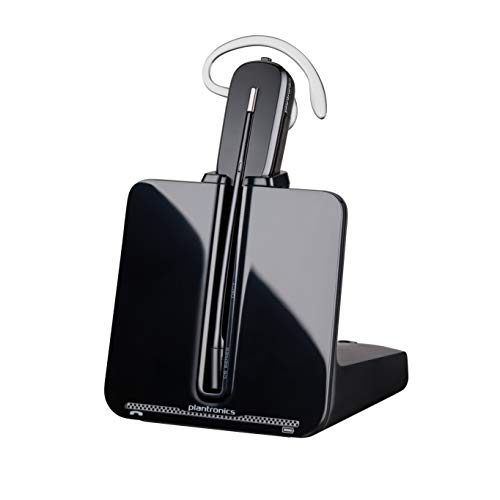

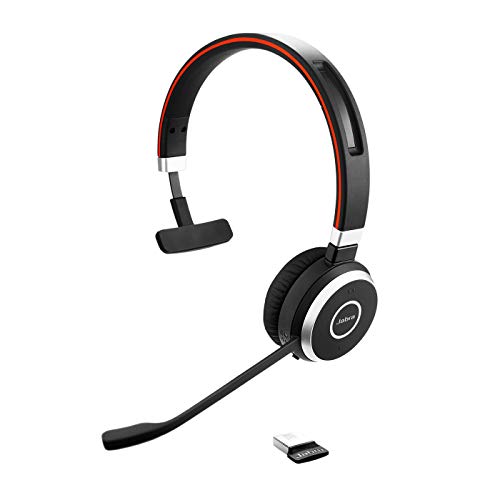
The Jabra Engage 75 SE is the headset you buy when dropped calls and static are not acceptable. This second-edition model pushes wireless range up to 150 meters (about 490 feet), which means you can walk to the break room, grab a coffee, and still hear your caller perfectly. The DECT connection is more stable than Bluetooth for office use because it operates on a dedicated frequency band that does not compete with Wi-Fi signals.
What impressed us most during testing was the advanced noise-cancelling microphone. We tested it in an open-plan office with conversations, keyboard clatter, and even a vacuum running nearby. The person on the other end reported hearing only our voice. Jabra says it meets Skype for Business Open Office requirements, and after our tests, we believe it. The integrated busylight on the earpiece glows red when you are on a call, giving colleagues a clear do-not-disturb signal without you saying a word.
Battery life is exceptional. We got a full workday plus overtime — roughly 13 hours of continuous talk time — before needing the charging stand. The ear cushion is soft leatherette that does not get sweaty after hours of wear. If you work in a busy office environment and rely on a desk phone or softphone throughout the day, this is the headset that removes all friction from your workflow.
Pros:
Cons:
The Jabra Engage 55 Mono is designed for the modern hybrid worker who splits time between home and office. It comes with a bendable USB DECT adapter that stays plugged into your laptop, so reconnecting after moving between locations takes zero effort. You open your laptop, put on the headset, and you are live. The adapter is pre-paired out of the box, which eliminates the pairing dance you deal with on Bluetooth headsets.
Call quality is outstanding. The noise-cancelling microphone handles background noise well, and the wideband audio makes voices sound natural rather than compressed. One feature we appreciated is the adjustable sidetone — this lets you hear your own voice in the earpiece so you do not end up shouting without realizing it. It is a small detail that makes a big difference during long conference calls.
The Engage 55 matches the 75 SE's 150-meter wireless range, and all conversations are encrypted over the DECT connection. This matters if you discuss sensitive information — financial data, medical records, or legal matters. The headset is certified for Google Meet and Zoom, and it works with Teams, Webex, and every other major platform we tested. The charging stand keeps it topped off and ready.
Pros:
Cons:
If you need one headset that connects to your computer, your phone, and works as a wired backup when the battery dies, the Poly Voyager 4310 UC checks every box. It connects to your PC or Mac via the included BT700 Bluetooth adapter, pairs directly to your phone over Bluetooth 5.2, and can even plug in via USB cable for corded use. That triple-connectivity approach means you are never stuck without a working headset.
The standout feature is Acoustic Fence technology in the dual-mic boom. During testing, we had someone talking three feet away from us while on a call. The person on the other end could not hear the nearby conversation at all. The boom mic is flexible, so you can position it close to your mouth for maximum clarity. Battery life hits up to 24 hours of talk time, which is the longest on this list for a Bluetooth headset.
The included charging stand is a nice touch — you drop the headset on it when you leave your desk, and it is always topped off when you grab it. For professionals who move between their desk, conference rooms, and mobile calls throughout the day, this is the most versatile option. It works with Teams, Zoom, and every platform we threw at it. If you also use smart lighting in your workspace, the busylight on this headset complements automated setups nicely.
Pros:
Cons:
The Poly Voyager 5200 is built for one purpose: crystal-clear mobile calls wherever you are. It wraps around your ear with a lightweight, ergonomic design that stays put whether you are walking, driving, or moving between meetings. At just 20 grams, you barely feel it. This is not a desk headset — it is a mobile warrior's communication tool.
The secret sauce is the four-microphone array with active Digital Signal Processing (DSP). Three mics handle voice pickup and noise cancellation while a fourth mic specifically targets wind noise. We tested it outdoors on a breezy day, and callers reported hearing us clearly with no wind interference. Voice commands let you answer or ignore calls without touching the headset — just say "answer" and the call connects.
Where the Voyager 5200 excels is its simplicity. There is no base station, no adapter, no charging stand required. You pair it to your phone via Bluetooth, slip it over your ear, and go. The ear hook design is more secure than in-ear buds, so it does not fall out during movement. Battery life is around 7 hours of talk time, which is enough for a heavy calling day. For the mobile professional whose phone is their primary communication tool, nothing else on this list matches the Voyager 5200's portability and wind-noise handling.
Pros:
Cons:
If your primary communication tool is a traditional desk phone (not a softphone on your computer), the Plantronics CS540 is purpose-built for you. It connects directly to your desk phone via an included cable and gives you wireless freedom to move around your workspace while on calls. The DECT connection delivers the same interference-free audio quality you get from the Jabra Engage series.
What makes the CS540 unique is its convertible design with three wearing styles. In the box you get an over-the-ear hook, an over-the-head band, and a behind-the-head band. You choose whichever is most comfortable for your head shape and preferences. This flexibility is something no other headset on this list offers. The noise-cancelling microphone does a solid job filtering out office background noise, keeping your calls professional.
The headset itself is incredibly light — the earpiece weighs just 21 grams. Combined with DECT wireless range of up to 350 feet, you can walk to the printer, grab a file, or check something with a colleague without putting your caller on hold. Battery life is around 7 hours, which covers a standard workday. If your office still relies on desk phones and you want wireless freedom without switching to a softphone setup, the CS540 remains the gold standard in 2026. For those who also need good workspace lighting during long calls, check out our guide to flicker-free LED dimmer switches.
Pros:
Cons:
Not everyone needs wireless. If you sit at your desk all day and want reliable call quality without worrying about battery life or wireless interference, the Poly Blackwire 3210 delivers at a fraction of the cost of the wireless options above. It connects via USB-C (with a USB-A adapter included), so it works with any computer made in the last decade. No pairing, no charging, no dropped connections — just plug it in and start talking.
The Dynamic EQ feature is surprisingly smart for a budget headset. It automatically detects whether you are on a voice call or listening to music and adjusts the audio profile accordingly. Calls sound clear and natural, while music gets a fuller frequency response. The inline controls give you quick access to answer/end calls, mute, and volume without reaching for your keyboard. The noise-cancelling microphone is not as advanced as the Jabra Engage series, but it handles normal office noise adequately.
Build quality is solid plastic — not premium feeling, but durable enough for daily office use. The padded ear cushion is comfortable for several hours, though you might want a break after a full day. At its price point, the Blackwire 3210 is the headset you buy in bulk for a call center or recommend to anyone who wants a no-fuss corded solution. If reliability and simplicity matter more than wireless freedom, this is your pick.
Pros:
Cons:
The Jabra Evolve 65 has been a staple in offices for years, and the MS Teams-certified version remains one of the most comfortable single-ear headsets you can wear all day. The leather-feel ear cushion and padded headband distribute weight evenly, so you do not get that pressure point on the top of your head after hours of use. Battery life hits 14 hours of talk time, which outlasts any normal workday.
It connects via the included Link 370 USB adapter for your computer and also pairs directly to your phone via Bluetooth. This dual-connectivity approach means you can take a call on your computer, then seamlessly switch to your phone when you need to step away. The wireless range reaches up to 100 feet (30 meters) — shorter than the Engage series but sufficient for moving around a typical office floor.
The noise-cancelling microphone handles office chatter well, and the integrated busylight signals to coworkers that you are on a call. Where the Evolve 65 really wins is the long game — wearing it for 8+ hours without ear fatigue. If comfort is your top priority and you want proven Microsoft Teams integration, this headset has been battle-tested in offices worldwide. The ability to charge via USB while still using the headset means you never have to take it off, even on the busiest call days. Much like choosing the right air purifier for an open floor plan, picking the right headset for an open office comes down to how well it blocks out your environment.
Pros:
Cons:
Your connection type determines range, audio quality, and what devices you can connect to. DECT headsets (like the Jabra Engage 75 SE and 55) offer the longest range (up to 150 meters) and interference-free audio because they use a dedicated frequency. They require a base station, which means they are best for desk-based workers. DECT technology has been the standard for cordless telephony for decades and remains the most reliable wireless option for voice.
Bluetooth headsets (Voyager 4310, Voyager 5200, Evolve 65) offer more flexibility since they connect to phones, tablets, and computers without a dedicated base. Range is shorter — typically 30 to 50 meters — but you gain portability. Wired headsets (Blackwire 3210) eliminate all wireless concerns but restrict your movement to the cable length.
Every headset on this list claims noise cancellation, but there is a wide gap between entry-level and premium implementations. The Jabra Engage series and Poly Voyager 4310 with Acoustic Fence represent the top tier — they actively block nearby conversations and office sounds from reaching your caller. The Voyager 5200's four-mic array adds dedicated wind cancellation for outdoor use.
Budget options like the Blackwire 3210 offer basic noise reduction that handles keyboard clicks and distant chatter but will not save you if someone is having a loud conversation next to you. If you work in an open office or noisy environment, prioritize headsets with multi-mic arrays and active noise processing.
Battery life ranges dramatically across our picks — from 7 hours (Voyager 5200, CS540) to 24 hours (Voyager 4310). Think about your actual calling patterns. If you are on calls for 6+ hours daily, you need either a headset with 12+ hours of battery or one with a charging stand that tops off between calls. The Jabra models and Voyager 4310 include charging stands, which is a genuine convenience feature, not a gimmick.
If battery anxiety is something you want to eliminate entirely, the wired Blackwire 3210 removes the issue completely. There is no battery to manage, no charging to remember — plug in and work.
Comfort becomes critical when you wear a headset for 4+ hours daily. The key factors are weight (lighter is better for single-ear designs), ear cushion material (leatherette breathes less but seals better; foam breathes more but wears faster), and clamping force (how tightly the headset grips your head). The Jabra Evolve 65 wins on comfort with its padded headband and leather-feel cushion, while the Voyager 5200 wins for those who prefer an over-ear hook that barely touches your head.
For office calls, yes. A single-ear headset lets you hear coworkers, doorbells, and your environment while still focusing on your call. Two-ear headsets provide better audio immersion for music or in extremely noisy environments, but for voice communication in a standard office, one ear free is a practical advantage that most professionals prefer.
Not directly. DECT headsets connect to a base station, which then connects to your desk phone or computer. They do not pair with cell phones like Bluetooth headsets do. If you need mobile connectivity, choose a Bluetooth option like the Poly Voyager 5200 or Voyager 4310, or get a dual-connectivity headset like the Jabra Evolve 65 that offers both USB adapter and Bluetooth.
Quality headsets from Jabra and Poly typically last 3 to 5 years with daily use. The battery is usually the first component to degrade — expect about 20% capacity loss after 2 years of heavy charging cycles. Ear cushions wear out every 6 to 12 months and should be replaced for hygiene and comfort. The headset electronics themselves rarely fail within 5 years.
For voice calls, the difference is subtle. Bluetooth 5.2 offers slightly better connection stability and lower latency, but call quality depends more on the microphone and speaker hardware than the Bluetooth version. Where newer Bluetooth matters is range — the Voyager 4310 with Bluetooth 5.2 maintains a more stable connection at distance than older models. For most users, microphone quality matters far more than Bluetooth version.
A charging stand is a convenience, not a necessity. It encourages you to dock the headset when not in use, which keeps the battery topped off. USB charging works fine but requires you to remember to plug in, and during charging the headset may not be positioned conveniently. If you frequently forget to charge devices, a stand solves that problem automatically.
Most models on this list are switchable. The Jabra Evolve 65 and Engage series let you rotate the boom mic to either side. The CS540's convertible design works on both ears. The Voyager 5200's over-ear hook is designed for the right ear by default but some users wear it on the left successfully. Check the specific model's documentation before purchasing if ear preference matters to you.
 |
 |
 |
 |

About Liz Gonzales
Liz Gonzales grew up surrounded by art and design in a New York suburb, with both parents teaching studio arts at the State University of New York. That environment sharpened her eye for aesthetics and spatial detail — skills she now applies to evaluating home products where form and function both matter. She has spent the past several years writing about lighting, home decor accessories, and outdoor living gear, with a particular focus on how products perform in real residential settings rather than showrooms. At Linea, she covers lighting fixtures and bulb reviews, outdoor and patio gear, and general home product comparisons.
You can Get FREE Gifts. Furthermore, Free Items here. Disable Ad Blocker to receive them all.
Once done, hit anything below
|
|
|
|