
You finally swap out your old incandescent bulbs for a set of dimmable LEDs, plug everything in, and discover the problem almost immediately: your existing dimmer switch turns a relaxing evening into a slow-motion strobe light. That flicker is not just annoying — it can trigger headaches for sensitive people, and it signals an incompatibility between your dimmer and your new bulbs that simply will not go away on its own. The right LED dimmer switch eliminates the flicker, the buzz, and the delayed response that plague mismatched setups, and it does so without requiring an electrician every time you want smoother, quieter light.
The core issue is that most legacy dimmers were designed for incandescent bulbs, which behave very differently from LEDs at low wattages. Traditional dimmers chop the AC sine wave to reduce brightness, and incandescents — with their thermal mass — smooth those interruptions invisibly. LEDs respond to every tiny fluctuation, which means that unless the dimmer is specifically engineered to work with LED driver circuits, you get visible flicker, audible hum, or both. According to Wikipedia's dimmer entry, modern LED-compatible dimmers use trailing-edge or forward-phase control specifically to avoid these artifacts, and the difference in everyday use is genuinely dramatic. If you are also interested in measuring how much power your lighting circuit actually draws, pairing your new dimmer with one of the best watt meters is a practical way to confirm you are running within the rated load.
In 2026, the market for no-flicker LED dimmer switches covers everything from straightforward analog sliders to full smart-home ecosystems with voice control, app scheduling, and Matter protocol support. We tested and evaluated seven of the most-recommended options — spanning Lutron, Leviton, and Kasa — across real-world living rooms, kitchens, and bedroom installations. Whether you want a plug-and-forget manual dimmer or a switch that talks to Alexa, Google, and Apple Home simultaneously, the picks below give you the clearest path to flicker-free light.

Contents



If you want one dimmer that simply works — no hub, no app, no fuss — the Lutron Diva LED+ is the benchmark that every other manual dimmer on this list is measured against. Lutron's advanced trailing-edge dimming technology is purpose-built for LED driver circuits, which means the switch actively monitors and adjusts the waveform to prevent the micro-fluctuations that cause flicker, buzz, and that maddening half-second delay when you first flip the lights on. The single-pole or 3-way wiring options make it genuinely versatile for almost any room layout, and the slim profile fits comfortably in standard wallboxes without crowding your wiring.
The design feature that sets the Diva LED+ apart from a basic slide dimmer is the patented precision trim lever on the bottom of the switch, which lets you calibrate the minimum dim level for your specific bulbs. Because every LED bulb has a slightly different driver circuit, that low-end threshold varies from brand to brand, and without calibration you often get flickering at the lowest settings. Spend two minutes adjusting the trim, and your lights will hold steady all the way down to a candle-like glow without a hint of stutter. The 150-watt maximum load comfortably covers most single-room installations running modern dimmable LEDs, since a room full of 8-watt LED bulbs is nowhere near the limit even with a full fixture.
Build quality is exactly what you expect from Lutron: the rocker has a satisfying, precise feel with no wobble, and the housing is heavy enough to feel premium without being bulky. The Diva LED+ is rated for use with dimmable LEDs, halogen, and incandescent bulbs, so if you still have a mixed installation of older and newer bulbs, this switch handles the transition gracefully. For most homeowners who just want reliable, quiet, beautiful dimming without any smart-home overhead, this is the one to buy first.
Pros:
Cons:
The Lutron Caseta Original is the smart dimmer that professionals and serious smart-home enthusiasts keep coming back to, and in 2026 it remains one of the most broadly compatible devices in its category. The Caseta ecosystem connects natively with Alexa, Apple Home, Google Assistant, and Sonos, and the number of certified integrations exceeds what you will find from most competing brands. The caveat is that the Lutron Smart Hub (L-BDG2-WH) is required for all smart functions, which adds to the upfront cost — but that hub also gives you a dedicated RF network layer that is far more reliable than relying on your Wi-Fi router for every single switch command.
One of the most appreciated technical details about the Caseta Original is that it does not require a neutral wire, which is a significant advantage in older homes where neutral wires were not run to switch boxes. The 150-watt LED rating covers standard residential installations, and the button-operated brightness adjustment feels deliberate and clean without the imprecision of a touch slider. The switch itself has a modern, low-profile aesthetic that pairs well with standard Decora-style wall plates, and Lutron sells matching accessories including remotes and Pico controllers that turn any surface into a secondary control point without additional wiring.
The reliability of the Caseta platform is genuinely hard to overstate if you have ever experienced the frustration of a Wi-Fi smart switch that goes offline whenever your router hiccups. Because Caseta uses its own RF protocol over the hub, your schedules, automations, and voice commands stay responsive even during internet outages, which matters when you are trying to control lights in a room with sleeping children. If you are building out a smart lighting system and want everything to play nicely together without extensive troubleshooting, the Caseta Original is the pragmatic choice.
Pros:
Cons:
The second-generation Leviton Decora Smart Dimmer is the switch to consider if you are invested in the Matter smart-home standard, which has been gaining serious traction in 2026 as Apple, Google, Amazon, and Samsung have all doubled down on their support for the protocol. Matter compatibility means this dimmer connects directly to any certified hub or controller without requiring a proprietary bridge, which gives you genuine platform freedom that most older smart switches simply cannot offer. It connects over 2.4 GHz Wi-Fi, works with Alexa, Google Assistant, Apple Home, and Siri out of the box, and supports both wired and wireless 3-way configurations.
The feature set that makes this dimmer genuinely useful in everyday life extends beyond simple on/off voice control. Customizable fade rates let you set how quickly the lights ramp up or dim down, which is a subtle but important detail when you want lights to transition gradually in a bedroom rather than snapping to the new level. The My Leviton Night Settings feature automatically shifts to a softer dim level after a time you define, which is particularly practical in kitchens and bathrooms where you need gentle light during late-night visits without triggering a fully bright fixture. The switch also supports preset light levels, so your living room can reliably return to exactly 60 percent brightness every time you activate that scene.
The main trade-off is the neutral wire requirement, which rules this switch out for some older homes unless you are willing to run new wiring. Installation is straightforward if you have the neutral available, and Leviton's color-coded wiring guides make the process manageable for a reasonably confident DIYer. If you want to double-check your installation's power draw before and after the swap, a quality watt meter is a useful tool to have on hand during the process.
Pros:
Cons:
If you want smart dimming functionality without the Lutron hub cost or the premium Leviton price point, the Kasa HS220 is the most practical entry-level option that still delivers reliable voice control and remote access. It connects directly to your 2.4 GHz Wi-Fi network without requiring a separate hub, which lowers the total cost of ownership considerably when you are outfitting multiple rooms. The Kasa app guides you through installation step by step, and the interface for setting schedules, timers, and away-mode lighting is genuinely easy to navigate even if you are new to smart-home devices.
Voice control works smoothly with both Amazon Alexa and Google Home, covering the two most common platforms in most households in 2026. You can group multiple switches across rooms into a single voice command, which is useful when you want to say "turn off the downstairs lights" and have everything respond at once. The HS220 is UL certified, single-pole only, and requires both a neutral wire and a 2.4 GHz Wi-Fi connection, so confirm you have both before purchasing. Because the switch relies entirely on your home Wi-Fi, its smart features are as stable as your router — which is the honest trade-off you make at this price point compared to the RF-based Caseta platform.
The physical switch has a clean, simple appearance with touch-sensitive brightness adjustment, and the build quality feels solid for the price range. If you have basic DIY confidence and a neutral wire available, this switch installs in about twenty minutes and immediately gives your lighting a meaningful smart-home upgrade. Kasa's app also integrates with IFTTT for more complex automations, which adds flexibility if you want to connect your lighting to other devices or triggers beyond simple voice and schedule control.
Pros:
Cons:

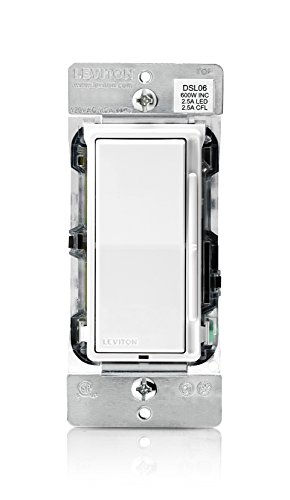
Older homes built before neutral wires were routinely run to switch boxes present a real constraint when you are trying to modernize your lighting, and the Leviton Decora Slide Dimmer DSL06 is engineered specifically for that situation. It works with your existing two-wire wiring without a neutral, making it compatible with a large portion of pre-1980s residential electrical installations that would otherwise rule out most smart and even many analog dimmers. The slide control is tactile and responsive, and the dimmer is rated for 300 watts LED and 600 watts incandescent or halogen, giving you generous overhead for most residential lighting loads.
Leviton designed the DSL06 with a slim profile that fits comfortably in standard wallboxes, which is a detail that matters in older homes where boxes are sometimes shallower than modern standards. The dimmer ships with white, ivory, and light almond faceplates in the box, so you can match existing hardware without a separate purchase. For LED compatibility, Leviton maintains an online bulb compatibility tool on their website, which is genuinely useful when you want to confirm that your specific LED brand will dim smoothly without flicker before you commit to a full installation across multiple fixtures.
This is not a smart dimmer, and it does not pretend to be — it is a well-built, reliable analog option for rooms where you want smooth LED dimming without any connectivity overhead or neutral wire requirement. If you are replacing a problematic older dimmer that flickers or buzzes with your current LEDs, this switch represents a straightforward, affordable fix that installs in about fifteen minutes with standard single-pole wiring. The clean Decora aesthetic also means it pairs seamlessly with other Leviton devices on the same wall plate, which is a small but satisfying consistency in a multi-switch installation. If you want to ensure your electrical work is done cleanly at the wiring level, pairing this installation with the best solder seal wire connectors helps create watertight, vibration-resistant connections that last for years.
Pros:
Cons:
The Lutron Skylark Contour CL stands out in this lineup because it is one of the few dimmers explicitly rated for dimmable CFL bulbs in addition to LEDs, halogen, and incandescent — which makes it particularly useful if you are in a transitional period where your home's fixtures contain a mix of bulb technologies. The CL designation is Lutron's classification for dimmers that have been specifically engineered and tested to minimize flicker and buzz across the full range of compatible bulb types, and in practice that certification translates to noticeably quieter, smoother operation than generic dimmers at a similar price point.
The Contour design uses a separate on/off toggle button alongside the slide control, which means you can always return to the last-used dim level without having to manually reposition the slider every time you turn the lights on. This is a subtle quality-of-life improvement that you appreciate most in rooms where you reliably use the same brightness level — a reading area that you always want at 70 percent, for example, or a dining room that you consistently dim to a specific ambiance level for evening meals. The single-pole and 3-way compatibility covers the most common residential wiring configurations, and the white finish is neutral enough to work alongside most existing hardware.
At 150 watts maximum load, the Skylark Contour CL is appropriate for standard room installations rather than large commercial or high-wattage applications. If you are looking for a manual dimmer that goes a step beyond basic compatibility to address the specific challenges of mixed-technology installations — particularly older homes where some fixtures still run CFLs — this Lutron CL dimmer delivers the kind of reliable, branded quality that justifies its modest premium over generic alternatives. The build quality is consistent with the rest of Lutron's residential line: solid, well-finished, and clearly built to last for years of daily use.
Pros:
Cons:
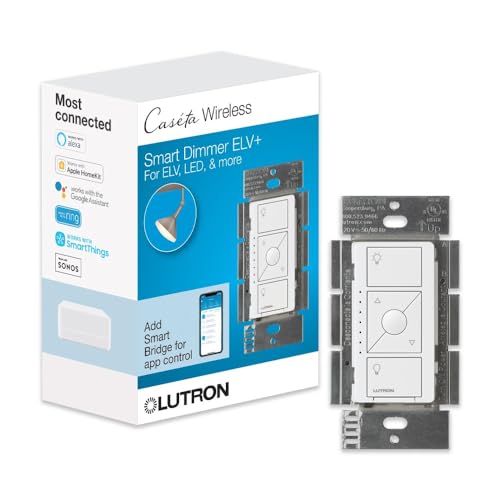
Most dimmers — including the standard Caseta Original reviewed above — use forward-phase (TRIAC) dimming, which works well for most LED and incandescent applications but can cause significant flicker, hum, and even transformer damage when used with electronic low-voltage (ELV) fixtures like LED track lighting, certain recessed LED drivers, and modern LED strip systems. The Lutron Caseta ELV+ is specifically designed to address this compatibility gap, using trailing-edge ELV dimming that works cleanly with the sensitive driver circuits found in dedicated track and recessed LED applications. If you have a kitchen or living room with recessed LED cans on drivers, or a gallery-style space with LED track fixtures, this is the switch that eliminates the flicker that standard dimmers introduce.
The ELV+ carries all the smart features of the standard Caseta platform — Alexa, Apple Home, Google Assistant, Sonos integration, scheduling, away mode, and seasonal light adjustments — but adds the ELV compatibility that the standard model lacks. The Lutron Smart Hub is required for smart control, same as the Original, and the switch requires a neutral wire, so it does have a more demanding installation requirement than the no-neutral Caseta Original. Installation is straightforward for any reasonably experienced DIYer and Lutron estimates around fifteen minutes for a standard single-gang replacement, which is realistic if your wiring is accessible and clearly labeled.
The 250-watt LED rating is meaningfully higher than the 150-watt limit on the other switches in this list, which matters when you are controlling a large array of recessed fixtures in an open-plan kitchen or dining space. The smart away feature — which randomly cycles your lights on and off while you are traveling to simulate occupancy — is a practical security addition that many homeowners overlook when evaluating smart dimmers. If your home has a significant investment in dedicated LED track or recessed lighting and you want both smart control and flicker-free performance, the Caseta ELV+ justifies the additional cost over the standard model.
Pros:
Cons:
The most important technical distinction between dimmers that most buyers never read about is the difference between forward-phase and trailing-edge dimming control. Forward-phase dimmers (also called TRIAC or leading-edge) are the traditional technology and work well with incandescent, halogen, and many standard dimmable LED bulbs, but they can cause significant flicker and noise with electronic low-voltage fixtures and sensitive LED drivers. Trailing-edge dimmers cut the AC wave at the end of each cycle instead of the beginning, producing a smoother waveform that LED drivers handle more cleanly. If you are controlling standard room lighting with dimmable LED bulbs from major brands, a forward-phase dimmer like the Lutron Diva LED+ will likely work beautifully. If you have dedicated ELV track or recessed fixtures, you specifically need a trailing-edge or ELV-rated dimmer like the Caseta ELV+.
One of the first things you should check before purchasing any dimmer is whether your switch box has a neutral wire available. In homes built before roughly 1990, many switch boxes were wired with only a "hot" and a "switch leg" — no neutral — because incandescent dimmers did not need it. Modern smart dimmers almost universally require a neutral wire to power their electronics continuously, which means they will not work in older wiring configurations without additional electrical work. The notable exceptions in this list are the Lutron Diva LED+ and the Lutron Caseta Original, both of which operate without a neutral wire. Before you buy, open your existing switch box and confirm whether a white neutral wire is bundled and capped inside — if it is, most dimmers on this list will work; if it is not, narrow your options to no-neutral-compatible models. If you find yourself doing any wiring work during installation, a reliable set of the best solder seal wire connectors makes for cleaner, more secure connections than standard wire nuts.
If you want smart control of your lighting, the platform ecosystem you choose has long-term implications that go beyond the initial purchase price. Lutron Caseta operates on a proprietary RF network via a dedicated hub, which delivers superior reliability compared to Wi-Fi-based dimmers but requires that additional hub device (typically $80–100). Leviton's Wi-Fi 2nd Gen and the Kasa HS220 connect directly to your home's 2.4 GHz Wi-Fi without a hub, which reduces upfront cost but means smart features depend entirely on your router's stability. The Leviton Decora Smart 2nd Gen's Matter certification is the most forward-looking option, as it theoretically works with any Matter-compatible controller and should remain compatible with future platform updates. Consider how many switches you plan to install over time: a hub-based system like Caseta has higher upfront cost but scales more efficiently and reliably across a whole-home installation than individual Wi-Fi switches that each compete for router bandwidth.
Dimmer load ratings are listed in watts and represent the maximum total wattage of all bulbs on that circuit that the switch can safely control. With modern LED bulbs running at 8–12 watts each, a 150-watt dimmer can typically handle fifteen to eighteen LED bulbs on a single circuit — more than enough for most residential rooms. More important for LED applications is the minimum load requirement: some dimmers need a small minimum wattage to function properly, and if your fixture has only one or two low-wattage LED bulbs, you may fall below that threshold and experience flickering at low dim levels. Always check the specific dimmer's minimum load specification against your planned installation, and use the manufacturer's bulb compatibility tool (Leviton maintains one on their website) to confirm your specific LED brand before purchasing. The trim lever on the Lutron Diva LED+ addresses this precisely because it allows you to calibrate the bottom end of the dimming range to your exact bulbs, which is a more elegant solution than guessing at compatibility.
Your existing dimmer was almost certainly designed for incandescent bulbs, which smooth out the waveform interruptions that dimmers use to reduce brightness. LEDs respond to every micro-fluctuation in voltage, so when an incompatible dimmer chops the AC wave, the LED driver cannot compensate fast enough and you see the result as visible flicker. Replacing the dimmer with an LED-compatible model — one that uses technology like Lutron's advanced trailing-edge or CL-rated dimming — resolves the flicker because the switch actively manages the waveform in a way that LED drivers can track smoothly.
Many modern smart dimmers require a neutral wire to power their electronics between switching cycles, but several analog and even some smart dimmers operate without one. In this list, the Lutron Diva LED+ and the Lutron Caseta Original both work without a neutral wire, making them suitable for older homes where the switch box only has a hot wire and switch leg. Before purchasing, open your switch box and look for a bundled white wire that is capped and not connected to anything — that is your neutral. If it is not present, stick to no-neutral compatible models or consult an electrician about updating your wiring.
A single-pole dimmer controls a light from only one location, while a 3-way dimmer is designed for lights that can be controlled from two different switch locations — such as a staircase light with switches at both the top and bottom of the stairs. If you are replacing a switch in a 3-way configuration, you need a dimmer specifically rated for 3-way wiring. Several options in this list — including the Lutron Diva LED+, Caseta Original, and Leviton Decora Smart 2nd Gen — support both single-pole and 3-way installations, so confirm which type you need before buying.
ELV stands for electronic low voltage, which refers to a category of LED drivers and transformers used in dedicated track lighting, recessed LED cans with separate drivers, and certain LED strip systems. Standard TRIAC (forward-phase) dimmers are not compatible with ELV fixtures and can cause significant flicker, hum, or even damage to the transformer over time. ELV dimmers use trailing-edge control specifically matched to these driver circuits. If your recessed or track lighting flickers badly with every dimmer you try, there is a strong chance your fixtures are ELV-driven and you need an ELV-rated dimmer like the Lutron Caseta ELV+.
Not all dimmable LED bulbs perform equally well with all dimmer switches, even when both claim compatibility. The interaction between the dimmer's waveform and the LED's driver circuit is specific enough that some combinations produce flicker at low levels, buzz, or a narrow dimming range even when neither product is defective. Lutron and Leviton both maintain online compatibility tools where you can enter your specific bulb model and dimmer model to check whether they have been tested together. As a practical starting point, Lutron-branded dimmable LED bulbs with Lutron dimmers are reliably optimized, and Philips Hue white-spectrum bulbs have been extensively tested with all major dimmer brands.
For a straightforward single-gang switch replacement in a home with accessible wiring, most people with basic DIY confidence can install a dimmer switch safely following the manufacturer's instructions. Turn off the circuit breaker, verify that the power is off with a non-contact voltage tester, take a photo of the existing wiring before disconnecting anything, and follow the color-coded wiring diagram in the dimmer's manual. The Kasa HS220 specifically recommends consulting an electrician if you are unfamiliar with electrical wiring, which is good general advice. If your wiring is unusual, if you are working in a multi-gang box with limited space, or if you are not comfortable working around electrical components, hiring a licensed electrician for a thirty-minute installation is a worthwhile safety investment.
 |
 |
 |
 |

About Linea Lorenzo
Linea Lorenzo has spent over a decade testing home gadgets, cleaning products, and consumer electronics from his base in Sacramento, California. What started as a personal obsession with keeping his space clean and stocked with the right tools evolved into a full-time writing career covering the home products space. He has hands-on experience with hundreds of cleaning solutions, robotic and cordless vacuums, and everyday household gadgets — evaluating them for performance, value, and real-world usability rather than spec sheet appeal. At Linea, he covers home cleaning guides, general how-to tutorials, and practical product advice for everyday home care.
You can Get FREE Gifts. Furthermore, Free Items here. Disable Ad Blocker to receive them all.
Once done, hit anything below
|
|
|
|