
by Liz Gonzales
Ever stood in your print shop staring at a wall of squeegees, unsure which one will actually deliver clean, consistent pulls across your screens? The right squeegee makes or breaks your print quality — and the wrong one wastes ink, clogs mesh, and leaves you with blotchy results you can't sell. After hands-on testing across fabric prints, plastisol applications, and water-based inks, our top overall pick for 2026 is the Speedball 4492 10" Fabric Squeegee — a reliable, purpose-built tool that delivers professional results without overcomplicating your workflow.
Screen printing squeegees are deceptively simple tools. A blade, a handle, and a durometer rating — that's the whole package. But those three variables interact in ways that directly affect ink deposit thickness, edge sharpness, and how smoothly ink flows through your mesh. Screen printing, as a craft and commercial process, depends heavily on consistent squeegee pressure and blade geometry. Choose a blade that's too soft and you'll push too much ink; go too stiff and you'll starve the print. This guide cuts through the noise and gives you concrete recommendations based on real-world use.
Whether you're a hobbyist printing tees in your garage or running a small commercial operation, the squeegees on this list cover every use case in 2026. You'll find options for fabric, mixed-media, wide-format, and professional shop work — all at price points that make sense. For more of our top-rated tools and equipment picks, browse the full reviews section. And if you're into printmaking supplies beyond squeegees, our guide to the best inks for precision work is worth a look for understanding ink viscosity and flow — concepts that transfer directly to screen printing.

Contents


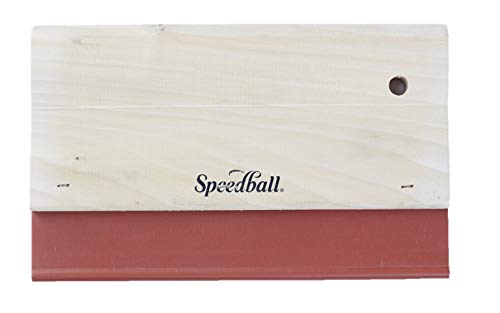



The Speedball 4492 earns the top spot because it does exactly what a fabric squeegee is supposed to do — push thick ink deposits through mesh cleanly and consistently. The 65 durometer nitrile blade is purpose-built for fabric printing, where you want a softer touch that floods the weave rather than skating over it. The rounded blade edges are the key differentiator here: they allow ink to roll through the screen with controlled pressure, giving you even coverage across garments without the drag marks you get from square-edged blades on softer substrates.
At 10 inches wide, this squeegee handles standard hoop sizes and small flat-bed print areas without requiring multiple passes. The wooden handle feels solid in-hand, and the blade is set securely — no wobble, no flex at the handle joint. Speedball has been in the screen printing supply game for decades, and this squeegee reflects that institutional knowledge. It's not flashy. It doesn't need to be. The 65 durometer rating is the sweet spot for plastisol and water-based inks on cotton and cotton-blend fabrics, which covers the majority of what hobbyist and small commercial printers are actually running in 2026.
One thing experienced printers will appreciate: the nitrile material resists solvent swelling better than cheap polyurethane blades. When you're cleaning with mineral spirits or screen printing emulsion removers, the blade holds its shape and durometer rating over time. This translates to more consistent print quality across the life of the tool — and that's the kind of detail that separates gear worth buying from gear worth replacing.
Pros:
Cons:
The Speedball 4491 is the 8-inch sibling of our top pick, and it earns its spot on this list by being the ideal starting squeegee for anyone new to fabric screen printing. At 8 inches, it's more manageable for smaller frames and one-color designs — the kind of projects that dominate beginner and hobbyist workloads. The same 65 durometer nitrile blade construction carries over from the 4492, so you're not sacrificing print quality to get a shorter tool.
What makes this particularly smart for beginners is the controllability. Shorter squeegees require less arm strength to maintain even pressure across the full stroke, which means fewer rookie mistakes like uneven pulls or lifted edges on fine-line designs. The rounded blade edges and the same comfortable wood handle as the 4492 make this a direct step-down in size without any compromise in quality. You get the same Speedball reliability in a more approachable form factor.
Experienced printers keep an 8-inch squeegee in rotation for spot printing, small specialty frames, and tight registration work. This isn't just a beginner tool — it's a versatile size that fills gaps in any shop's squeegee lineup. If you're building your first kit, start here and add a 10-inch or 12-inch as your projects scale up.
Pros:
Cons:
The Caydo 2-piece set gives you two sizes — a 9.4-inch and a 5.9-inch — in one purchase, making it the smartest budget buy for printers who need versatility out of the gate. The 75 durometer rubber blade is harder than the Speedball options, which changes the ink deposit profile significantly. A 75 durometer blade pushes less ink through the mesh per stroke, making it better suited for conventional halftone printing and fine-detail work where ink bleed is the enemy.
The rubber blade material is a departure from the nitrile and polyurethane options on this list. Rubber is a classic squeegee material — predictable, widely available for replacement, and effective across most water-based ink formulations. The wooden handle is straightforward and solid. Both squeegees in this set have the same 4.3-inch handle depth, which gives you good grip leverage without fatigue on longer runs. At this price point, you're not getting a professional-grade tool, but you're getting two functional squeegees that will genuinely perform in a hobby or light commercial setup.
The size combination is well thought out. The 9.4-inch handles standard print areas, while the 5.9-inch is perfect for spot-color work, small frames, and detail fills. Buy this set as your entry point and upgrade individual pieces as you identify what your workflow actually demands. It's the kind of practical starter kit that our roundup of the best marking gauges echoes in its approach — give beginners useful, accurate tools without overcomplicating the decision.
Pros:
Cons:
If you're serious about longevity, the aluminum-handled 12-inch squeegee is in a different league from anything wood. Aluminum handles don't crack, warp, swell, or absorb solvents — the three failure modes that eventually kill every wooden-handled squeegee in a working print shop. At 12 inches wide, this is the workhorse size for medium and large flat-bed prints, covering more surface area per stroke and reducing the total number of passes needed on bigger designs.
The polished aluminum handle has genuine ergonomic advantages over raw wood. The smooth finish reduces friction against gloved hands, the handle doesn't need seasonal maintenance, and it wipes clean instantly without the grain absorption issues you get with wood. The solvent-resistant blade is built for multiple-use durability — it handles the cleaning cycle after plastisol, water-based, and discharge ink runs without degrading. This is the squeegee you buy when you're tired of replacing tools.
The 12-inch width is a meaningful upgrade over 10-inch options for anyone printing larger garment graphics, banner sections, or wide repeat patterns. You cover 20% more surface per stroke, which adds up to real time savings over a production run. The aluminum construction also means consistent blade pressure across the full 12-inch span — no handle flex mid-stroke that you occasionally feel with longer wooden handles under heavy pressure.
Pros:
Cons:
HARFINGTON's 8-inch polyurethane squeegee brings professional-grade materials to a compact form factor. The polyurethane blade at 65 durometer is the best blade material on this list for solvent resistance and long-term shape retention. Polyurethane outlasts both rubber and nitrile in repeated solvent-cleaning cycles, maintaining its original durometer rating far longer — which means your print consistency doesn't drift as the blade ages. At 21mm thick, the blade is substantial enough to hold a clean, stable edge under pressure without flexing unpredictably.
The flat-head blade geometry is the design choice that sets this apart from rounded-edge fabric squeegees. Flat-head design distributes ink pressure evenly across the full contact surface, which is exactly what you want for consistent ink distribution on flat substrates — paper, cardboard, rigid panels, and tightly woven fabrics where you need edge-to-edge uniformity rather than a flooded fabric weave. The hardwood handle is smooth, without burrs, and the ergonomic shaping reduces hand strain on longer print sessions.
At 8 inches, this is the precision tool in the HARFINGTON lineup. Use it for small-batch specialty printing, mixed-media work, and applications where you're switching between ink types frequently — the polyurethane blade cleans up faster and more completely than rubber alternatives. The 1-inch blade thickness also keeps the ink from creeping up toward the handle, a small but meaningful quality-of-life detail that experienced printers will immediately notice.
Pros:
Cons:
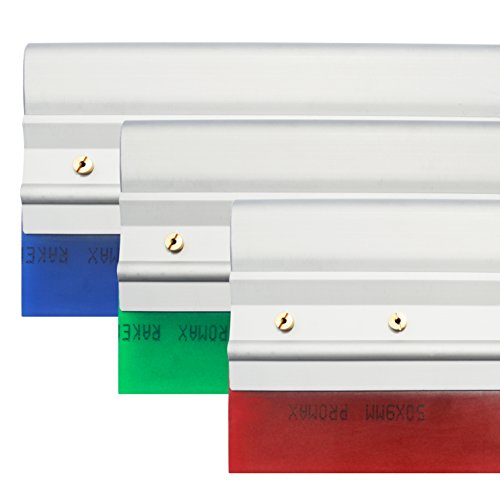
When you need to cover wide print areas in a single stroke, a 14-inch aluminum squeegee with an 80 durometer blade is the professional's answer. The polished aluminum handle on this set is built for manual screen printing environments where durability and consistency across thousands of strokes are non-negotiable. At 80 durometer, this is the stiffest blade on our list — designed for halftone work, fine-line detail, and controlled ink deposits where blade flex would destroy registration.
The solvent resistance of the aluminum handle system means this tool survives everything a working print shop throws at it — plastisol cleanup with mineral spirits, emulsion removal, and repeated daily use without the handle degrading. The polished finish on the aluminum reduces grip friction and makes cleaning between ink colors fast. This is the squeegee you bring out for large-format prints on rigid substrates or wide flat-bed applications where a shorter tool would require multiple passes and introduce registration variance.
The blue color coding on the 80 durometer blade is a professional shop standard — color-coded squeegees let you grab the right durometer at a glance without reading labels mid-run. If you're managing a shop with multiple durometer options, this color system pays real dividends in efficiency. The 14-inch width handles banner-scale designs, wide garment graphics, and large specialty printing in a single clean stroke.
Pros:
Cons:
HARFINGTON's 14-inch polyurethane squeegee bridges the gap between the stiff 80 durometer professional tools and the softer fabric-focused options. At 65 durometer across a 14-inch blade, you get the versatility to handle both fabric printing and mixed-substrate work at large format — without the blade rigidity that makes 80 durometer tools unforgiving on textured surfaces. The polyurethane construction delivers the same superior solvent resistance as the 8-inch HARFINGTON, scaled up to cover large garment graphics and wide flat-bed prints.
The 21mm blade thickness carries through from the smaller HARFINGTON model — a meaningful spec at this width. Over a 14-inch span, blade thickness directly affects pressure consistency. Thinner blades flex more at width, creating uneven ink deposits at the center of the stroke versus the edges. The 21mm polyurethane blade on this squeegee stays flat under pressure, giving you edge-to-edge print consistency that thinner blades at this width simply can't match. The hardwood handle is smooth, ergonomically shaped, and keeps your hand positioned correctly for the longer stroke a 14-inch squeegee requires.
This is the squeegee for printers who've outgrown 10-inch tools but don't want to give up the softer durometer that makes fabric printing forgiving. Large-format t-shirt graphics, all-over printing on large frames, and wide specialty applications are where this squeegee performs best in 2026. If your print shop is also focused on precision in other tool categories — the way our guide to the best print servers approaches network printing infrastructure — the HARFINGTON 14-inch brings that same commitment to getting wide-format work right the first time.
Pros:
Cons:
Durometer is the hardness rating of your squeegee blade, measured on the Shore A scale. It's the spec that most directly controls your print results, and getting it wrong wastes both ink and substrate. Here's the practical breakdown for 2026:
The rule of thumb among professional printers: match your durometer to your ink viscosity. Thin inks on smooth substrates need harder blades. Thick inks on textured fabrics need softer ones. When in doubt, start with 65 and adjust based on your results.
All three blade materials appear on this list, and each has a distinct performance profile that affects your long-term costs and print quality.
For high-volume shops, polyurethane pays for itself in blade life. For hobbyists and low-frequency use, nitrile or rubber are perfectly functional choices that won't break the budget.
The handle affects your grip, fatigue, and long-term tool durability more than most buyers anticipate. Wood handles are lighter and warmer to the touch, which matters during extended print sessions. They're also cheaper to manufacture, keeping entry-level squeegee prices accessible. The downside is absorption — wood absorbs solvents, ink, and moisture over time, which can weaken the handle-blade bond and make the tool harder to clean.
Aluminum handles solve all of those problems at a higher price point. They're heavier, which increases fatigue on long runs, but they're essentially maintenance-free. No swelling, no cracking, no absorption. For professional shops running hundreds of prints per week, the math on aluminum handles is straightforward: lower replacement frequency outweighs the higher initial cost.
Width selection should follow your most common frame sizes. The 8–10 inch range covers the majority of hobbyist and small-shop work. Bump to 12–14 inches when your designs regularly run wider than your standard hoop size. Avoid the temptation to always buy the widest squeegee — wider blades require more force to pull evenly, and imprecise technique on a 14-inch squeegee produces worse results than clean technique on a 10-inch one. Just as you'd match a tool's scale to its task in any craft — the way we cover tool sizing in our guide to best microfiber mops for different floor coverage areas — squeegee width selection is about matching the tool to the actual job, not buying the biggest option available.
Blade edge geometry is the feature most buyers overlook, and it's directly responsible for the difference between a flooded fabric print and a crisp detail print.
If you're printing on both fabric and paper regularly, maintain two squeegees — one with rounded edges for fabric work and one with flat edges for paper and rigid substrates. Trying to use a single blade profile for both will produce compromised results on one substrate or the other.
For fabric screen printing with plastisol or water-based inks, a 65 durometer blade is the standard professional choice. The softer blade allows more ink to flood through the mesh and into the fabric weave, producing saturated, even coverage. If you're printing fine halftones on fabric, you can step up to 70–75 durometer for better dot definition — but for solid fills and standard garment printing in 2026, 65 durometer is the proven sweet spot.
Both materials are solvent-resistant and suitable for professional screen printing, but polyurethane is the superior long-term choice. Polyurethane maintains its durometer rating longer through repeated solvent-cleaning cycles, resists swelling better in contact with harsh cleaning chemicals, and cleans up more completely between ink changes. Nitrile is less expensive and works well for fabric printing, making it the practical choice for hobbyists and lower-volume operations. For high-volume professional shops, polyurethane blades justify their higher cost through extended service life.
Your squeegee should be wider than your print image but narrower than your screen frame. As a practical rule, add 1–2 inches on each side of your image width. For standard small-format garment printing, an 8–10 inch squeegee handles the majority of designs. For medium designs and wide graphics, a 12-inch squeegee covers more area per stroke. For large-format prints and wide flat-bed applications, a 14-inch squeegee eliminates multiple-pass registration problems. Start with a 10-inch as your primary tool and add sizes as your project range expands.
Yes, for professional and high-volume use. Aluminum handles don't absorb solvents, won't crack or warp with heavy use, and require zero maintenance beyond wiping clean. Over the lifespan of a working print shop, aluminum handles replace less frequently than wood, which makes the higher upfront cost rational. For hobbyists and occasional printers, wood handles are perfectly functional and far more affordable. The decision comes down to your print frequency — if you're running a shop daily, invest in aluminum.
Yes, with proper cleaning between ink types. Both nitrile and polyurethane blades handle water-based and plastisol inks without compatibility issues. The key is thorough cleaning — plastisol requires mineral spirits or commercial plastisol cleaners; water-based inks clean up with water before they dry. Never let either ink type cure on your blade. If you switch between ink systems frequently, polyurethane blades are the better choice because they clean up more completely and resist solvent swelling better than rubber alternatives.
Replace your squeegee blade when you notice any of these signs: visible nicks or gouges along the blade edge, uneven ink deposits across the print (streaking or thin spots), the blade edge has developed a permanent curve or roll from repeated use, or the blade has swelled and softened noticeably from solvent exposure. A good blade properly maintained can last hundreds of print sessions. Store your squeegees blade-up or hanging vertically — never resting on the blade edge — to prevent permanent deformation between uses.
Choosing the right screen printing squeegee in 2026 comes down to three variables: your durometer, your blade material, and your width. Start with the Speedball 4492 if you're printing on fabric and want a proven, no-fuss tool that delivers consistent results. Step up to a polyurethane blade from HARFINGTON or an aluminum-handled option when your volume and print demands grow. Pick up the Caydo 2-piece set if you're just getting started and want two useful sizes without a large investment. Whatever you choose, buy the right tool for your actual substrate and ink type — that single decision will improve your print quality more than any other upgrade you can make to your setup.
 |
 |
 |
 |

About Liz Gonzales
Liz Gonzales grew up surrounded by art and design in a New York suburb, with both parents teaching studio arts at the State University of New York. That environment sharpened her eye for aesthetics and spatial detail — skills she now applies to evaluating home products where form and function both matter. She has spent the past several years writing about lighting, home decor accessories, and outdoor living gear, with a particular focus on how products perform in real residential settings rather than showrooms. At Linea, she covers lighting fixtures and bulb reviews, outdoor and patio gear, and general home product comparisons.
You can Get FREE Gifts. Furthermore, Free Items here. Disable Ad Blocker to receive them all.
Once done, hit anything below
|
|
|
|