
The average American household wastes up to $400 a year on standby power alone — electricity quietly draining from devices that look like they're off but aren't. A good watt meter (also called a power monitor or energy monitor) gives you the visibility to stop that waste cold. Whether you're trying to slash your electric bill, identify a power-hungry appliance, or just understand where your electricity is going, a watt meter pays for itself in a matter of weeks. In 2026, these devices have gotten smarter, easier to read, and more versatile than ever — so the real question isn't whether you need one, but which one fits your situation best.
At their core, watt meters measure how much electrical power (in watts) a device is drawing at any given moment, and how much total energy (in kilowatt-hours, or kWh) it has consumed over time. That kWh number is exactly what your utility company bills you for, so being able to track it yourself puts you in control. Some meters plug directly into a wall outlet and accept a single appliance; others clamp around your home's main wires and track your whole house at once; and a few are designed specifically for USB devices. Understanding these differences before you buy makes all the difference. You can also check out our full guide to power meters for a broader overview of the category.
We've tested and researched six of the top-rated watt meters available right now, covering a range of use cases from basic plug-in monitoring to panel-level whole-home tracking. Below you'll find honest, detailed reviews of each one, along with a buying guide that cuts through the jargon and a FAQ section covering the questions real shoppers ask most. If you enjoy digging into electrical testing tools, you might also find our reviews of the best power supply testers and the best combustion analyzers useful companions to this guide.

Contents





The Kill A Watt EZ has been the gold standard of plug-in energy monitors for well over a decade, and it still holds up in 2026. The reason it's stayed popular is simple: it does exactly what it promises, without any setup headaches. You plug it into a wall outlet, plug your appliance into it, and within seconds you're looking at real-time wattage on a large, easy-to-read LCD display. But what really sets the EZ version apart from its predecessor is the built-in cost forecasting feature. You enter your electricity rate, and the meter instantly calculates projected costs by week, month, and year. That's genuinely useful data — not just raw numbers you have to interpret yourself.
The display cycles through eight different measurements, including volts, amps, watts, kilowatt-hours, hertz (the frequency of your power supply), and running time. One underrated feature is the built-in battery backup, which means accumulated data doesn't vanish when you unplug the device. That matters when you're tracking something like a chest freezer or a window AC unit across multiple days. Build quality is solid — the housing is sturdy grey plastic that doesn't feel cheap, and the prongs seat firmly in outlets. It handles loads up to 1,875 watts, which covers most standard household appliances. If you're tracking an electric dryer or a large electric range, though, you'll need something with a higher capacity.
For straightforward home use — checking how much your old refrigerator costs to run, or figuring out whether your space heater is really as expensive as you think — the Kill A Watt EZ is hard to beat. It's not flashy, it doesn't connect to an app, and the display isn't backlit (which can be a nuisance in dim utility rooms). But for pure reliability and accuracy at a reasonable price, it remains one of the most trusted options on the market.
Pros:
Cons:
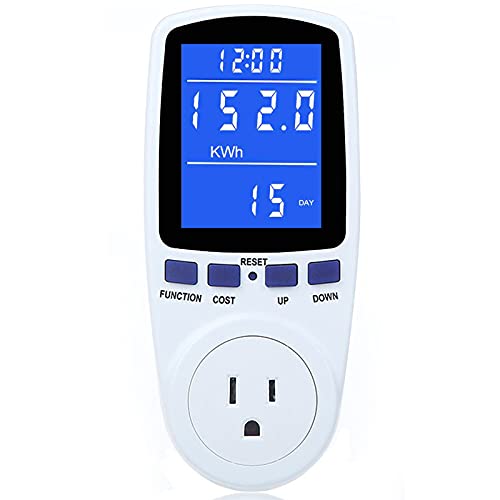
If the Kill A Watt EZ is the dependable veteran, this Upgraded Power Meter Plug is the scrappy newcomer that closes the gap on several of its predecessor's weaknesses. The most obvious improvement is the backlit LCD screen — a 2.36 x 1.85 inch display with 180-degree wide viewing angles. That's a significant practical upgrade. You don't have to crouch down and stick your face in front of a dim screen anymore; you can read it from almost any angle, day or night. The adjustable backlight timer (1 hour, 4 hours, 8 hours, or always-on) means you can customize battery-friendliness to your situation, which is a thoughtful touch.
Beyond the display, this meter packs in seven display modes that cover power (W), energy (kWh), volts, amps, hertz, power factor (how efficiently a device is using electricity), cost, and even minimum/maximum power tracking. That last feature is handy — it lets you see the peak wattage a device pulls at startup, which is often much higher than its running wattage. It also tracks cumulative days and run time. Overload protection kicks in to safeguard the meter and your appliance if the connected device draws more than the rated limit. The cost calculation feature works similarly to the Kill A Watt EZ — you enter your per-kWh rate and it projects your bill automatically.
The trade-off is that this is a newer brand with a shorter track record, so long-term durability is harder to verify. The interface — using "UP," "DOWN," and "COST" buttons to navigate modes and settings — takes a few minutes to get used to. But once you're oriented, it's intuitive. For the price point, this meter genuinely punches above its weight, and it's a strong pick for anyone who wants more features than the classic Kill A Watt without spending significantly more money.
Pros:
Cons:
The briidea 4-Outlet Monitor solves a problem that the single-plug meters simply can't: what happens when you need to monitor multiple devices at once? With four outlets built into a single unit, you can plug in your TV, gaming console, speaker, and streaming device simultaneously and get a combined real-time energy picture. For anyone auditing an entertainment center, a home office setup, or a kitchen appliance cluster, this design is a genuine time-saver. No more swapping a single plug-in meter from device to device and trying to mentally add up your numbers.
The feature set is solid across the board. You get real-time measurements of power, voltage, current, frequency, power factor, energy in kWh, and run time. The backlit LCD display activates automatically when you press any button and turns off after 8 seconds to preserve power — a sensible design choice. There's also an overload alert system that warns you if the total connected load exceeds safe limits, which is especially important when four devices are all drawing power simultaneously. The memory function retains accumulated data even when power is cut, so you won't lose your tracking history during a brief outage.
The main thing to understand is that this meter reads the combined load of all four outlets together — it doesn't break down consumption per individual outlet. So you'll know your entertainment center as a whole is using 287 watts, but not which specific device is the biggest culprit. For a lot of people, the combined reading is enough. But if you need granular per-device data, you'd need to test one device at a time. Still, for monitoring a cluster of devices with one unit, the briidea is a smart and practical solution that's genuinely useful in 2026.
Pros:
Cons:
The efergy Elite-Max takes a fundamentally different approach from every other meter on this list. While the plug-in monitors measure one appliance at a time, the Elite-Max tracks your entire home's energy consumption by clamping sensors around the main power cables in your electrical panel (the big box where your circuit breakers live). The result is a bird's-eye view of everything your house is using, in real time, displayed on a large 7.9-inch color screen. If you've ever wanted to see your total home wattage displayed in big, color-coded numbers, this is the device that does it.
The color-coded display is genuinely intuitive — green means you're using relatively little power, and the colors shift as consumption climbs, giving you an instant visual cue without having to interpret numbers. There's no WiFi required, which is a meaningful design choice. A lot of smart home energy monitors require a cloud account, monthly fees, or a stable internet connection to function. The Elite-Max works completely standalone. And importantly, it lets you download your energy data directly from the monitor itself, so you own your own data — no third-party server holds it hostage.
The installation step is worth mentioning plainly: you or a qualified electrician will need to open your electrical panel to attach the current transformer (CT) clamps. If that sounds intimidating, it is — electrical panels carry real hazards, and this is not a job for everyone. Many users hire an electrician for this step, which adds to the cost. Once installed, though, the system runs seamlessly. For homeowners who are serious about understanding and reducing their total energy footprint in 2026, the Elite-Max offers whole-home visibility that no single-outlet meter can match. According to the U.S. Department of Energy, monitoring your energy consumption in real time is one of the most effective steps you can take to reduce household electricity costs.
Pros:
Cons:
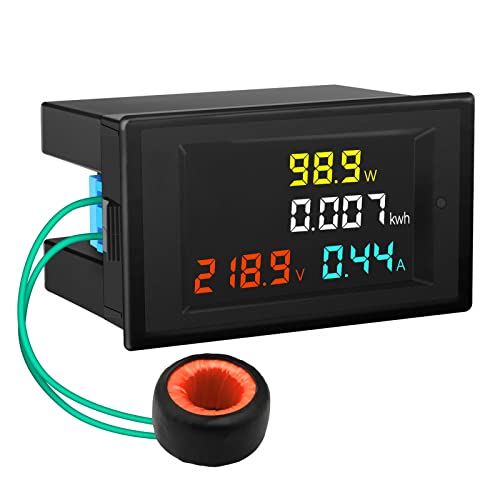
The DROK AC Power Meter is built for a different audience than the plug-in consumer monitors above. This is a panel-mount instrument designed to be permanently wired into an electrical enclosure, control panel, or DIY power monitoring system. If you're an electrician, an electronics hobbyist, a solar installer, or someone building out a workshop or generator setup, this meter gives you professional-grade measurements in a compact, permanently installed form factor. It's not something you plug into a wall outlet — it requires hardwired connections and basic electrical knowledge to install.
Once wired in, the DROK measures AC voltage from 80 to 300 volts and current up to 100 amps, which means it can handle loads up to 30,000 watts (30kW). That's far beyond what any standard household appliance needs, which is exactly the point — this meter is built for high-current environments like workshop panels, whole-circuit monitoring, or small commercial setups. The color LCD display shows voltage, amperage, active power (watts), and cumulative energy (kWh) simultaneously. Readings update twice per second, which gives you fast response to changing loads. A built-in switch lets you reset the energy counter (kWh reading) when you want to start a fresh measurement session.
The included current transformer (CT) clamp — a 15.5mm clip that loops around a wire — is what makes this a non-invasive current measurement. Your main circuit wire passes through the CT; no direct contact with live conductors required for the current sensing portion. That said, you do still need to connect the voltage sensing wires, which does involve working with live circuits. This is not a beginner's device, and it's not trying to be. For the technically inclined user who needs accurate, always-on panel monitoring with a clear display, the DROK is an excellent value. It also pairs well with projects where you need to monitor the output of a generator or solar inverter — situations where the other meters on this list simply don't apply. If you work with complex electrical testing setups, you might also appreciate our roundup of the best solder seal wire connectors for clean, reliable wiring jobs.
Pros:
Cons:
Not every watt meter needs to handle household appliances. If your goal is to test and understand your USB charging ecosystem — chargers, cables, power banks, laptops — the Klein Tools ET920 is purpose-built for exactly that job. It passes through both USB-A and USB-C connections and measures voltage and current in real time, showing you how much power is actually flowing to your device versus what the charger claims. That gap is often surprisingly large. A charger that advertises 65 watts of output might actually deliver 48 watts to your laptop due to cable resistance, port degradation, or simply false advertising.
The ET920 covers USB-A testing for voltages from 3 to 20V DC and currents up to 3A, and USB-C from 3 to 20V and up to 5A — covering virtually all standard charging scenarios including Qualcomm Quick Charge and USB Power Delivery protocols. Beyond instantaneous power, it continuously logs capacity (in mAh), energy (in mWh), and resistance (calculated) for up to 1,000 hours, and it can store up to 10 separate readings in memory for easy comparison. That makes it legitimately useful for testing multiple chargers or cables in sequence and keeping records of each one.
Klein Tools is a respected American brand with over 160 years in professional hand tools and test equipment, so build quality and accuracy are hallmarks here. The display is small but clear and easy to navigate. The one honest limitation is scope — this meter measures DC current only, so it can't tell you anything about AC household appliances. But if you're a tech person who charges multiple devices daily, travels with a lot of gear, or just wants to make sure your new USB-C charger is doing what the box says, the ET920 is the most purpose-fit tool for that job in 2026.
Pros:
Cons:
This is the first question to answer, and it shapes every other decision. There are three main types. Plug-in energy monitors (like the Kill A Watt EZ, Upgraded Power Meter, and briidea 4-Outlet) are the most common for home use. You plug them directly into a standard wall outlet, then plug your appliance in, and they measure power in real time. They're affordable, portable, and require zero installation. If your goal is auditing your refrigerator, air conditioner, space heater, or any standard household device, this is the type you want.
Whole-home energy monitors (like the efergy Elite-Max) use CT clamps attached to your electrical panel to monitor your entire home's consumption at once. They give you a macro view — great for understanding your total bill and seeing usage trends over time — but they don't tell you which specific appliance is responsible. They cost more and require installation. Panel-mount meters (like the DROK) are for workshops, custom electrical builds, generators, or solar setups — they're hardwired permanently and suited to technically inclined users. And USB power meters (like the Klein Tools ET920) are a niche but valuable category for testing charging equipment. Knowing which type fits your need prevents you from buying the wrong tool entirely.
All watt meters measure watts (W) and kilowatt-hours (kWh). Watts tells you the rate of power consumption right now; kWh tells you how much total energy has been used over time — and kWh is what your utility bill is based on. Beyond that baseline, additional measurements vary by device. Voltage (V) and current/amps (A) are useful for diagnosing electrical problems, not just tracking energy costs. Power factor is a ratio (0 to 1) that indicates how efficiently a device is converting electrical power into useful work — a power factor below 0.9 means some energy is being wasted as heat or electromagnetic interference. Frequency (Hz) tells you the quality of your power supply.
Cost projection is a separate but highly practical feature — you enter your per-kWh rate (find it on your utility bill), and the meter calculates your projected daily, monthly, and annual cost for whatever appliance is connected. If your primary goal is understanding your electric bill, this is the feature to prioritize. If you're an electrician or DIYer doing diagnostic work, accuracy at voltage and current measurements becomes more important. Match the feature set to your actual use case rather than buying the most feature-rich meter regardless of need.
You'd be surprised how much this matters in practice. A watt meter you can't easily read is one you'll stop using. If the device will live in a dim utility closet, basement, or behind furniture, a backlit display is essential — the Kill A Watt EZ's lack of backlight is a real drawback in those scenarios, while the Upgraded Power Meter's large backlit screen with 180-degree viewing angles solves that problem directly. Screen size matters too, especially for whole-home monitors like the efergy Elite-Max where you're reading the display from across a room.
Consider how many metrics you can see simultaneously. Some meters cycle through modes one at a time; others show several readings at once. If you want to glance at your meter and instantly see watts, kWh, and cost without pressing any buttons, look for a model with a multi-parameter simultaneous display. The efergy's color-coded readout goes one step further, using visual cues so you don't even have to read numbers to get a quick sense of your usage level. Think about where you'll physically place the meter and what viewing conditions you'll have before making your decision.
If you want to do serious energy analysis — tracking seasonal patterns, comparing before and after an appliance upgrade, or monitoring trends over months — data storage and connectivity become important. Basic plug-in meters like the Kill A Watt EZ rely on their built-in memory to accumulate kWh over time, which works fine but requires you to manually note readings. The efergy Elite-Max allows direct data download, giving you spreadsheet-level analysis without any cloud dependency.
The Klein Tools ET920 stores up to 10 readings in memory for side-by-side comparison — ideal for testing multiple cables or chargers. If you're drawn to the idea of cloud connectivity and smart home integration, be aware that many WiFi-enabled energy monitors (not featured here) require active subscriptions or app ecosystems that may change over time. The devices in this review all work independently of any internet connection, which means they'll keep functioning exactly the same in five years without any service changes affecting them. That's a meaningful long-term reliability advantage worth weighing against the convenience of app connectivity. For a deeper dive into related monitoring tools, see our review of the best power supply testers which covers overlapping territory for electronics diagnostics.
A watt meter measures how much electrical power a device or system is consuming, either in real time (watts) or cumulatively over time (kilowatt-hours). At home, people use them to identify energy-hungry appliances, calculate the actual cost of running specific devices, find "phantom loads" (devices consuming power even in standby mode), and verify whether a new appliance is as efficient as advertised. Professionals use them for electrical diagnostics, panel monitoring, and verifying that circuits are operating within safe parameters.
Watts (W) measure the rate of power consumption — think of it like miles per hour. Kilowatt-hours (kWh) measure total energy consumed over time — think of it like total miles driven. One kilowatt-hour equals 1,000 watts running for one hour. So if your space heater draws 1,500 watts and you run it for two hours, it has consumed 3 kWh. Your electric bill is calculated in kWh (multiplied by your rate per kWh), which is why tracking kWh is the most directly actionable measurement for reducing your electricity costs.
Yes, meaningfully so in many cases. The most common savings come from discovering which appliances are the biggest consumers (often surprising — older refrigerators and HVAC systems are frequent culprits), identifying phantom loads from devices left on standby, and making informed decisions about upgrading inefficient appliances. According to the U.S. Department of Energy, standby power can account for 5–10% of a home's annual electricity use. A $30 plug-in meter that helps you eliminate even a fraction of that waste can pay for itself within weeks.
Generally yes, to within 1–2% for most reputable brands. For everyday home energy monitoring purposes — determining whether an appliance costs $5 or $15 a month to run — that level of accuracy is more than sufficient. For professional-grade measurement applications, panel-mount meters like the DROK or dedicated clamp meters are held to tighter tolerances. The key is using a meter from a known brand and ensuring the device's rated voltage and current range matches the appliance you're testing. Operating a meter outside its rated range produces unreliable readings.
Most standard plug-in watt meters, including the Kill A Watt EZ and the Upgraded Power Meter on this list, are rated for up to 1,875 watts, which corresponds to the 15-amp capacity of a standard US household outlet. This covers the vast majority of common appliances — refrigerators, televisions, desktop computers, window AC units, and most kitchen appliances. However, large electric appliances like electric dryers, electric ranges, central air conditioners, and electric water heaters operate on 240V circuits and draw far more power than a standard plug-in meter can handle. For those, you need a whole-home monitor or a panel-mount meter.
Not for any of the meters reviewed on this page. All six products here work as fully standalone devices with no internet connection, no app, and no subscription required. The efergy Elite-Max and Klein Tools ET920 allow data downloads via direct connection, but neither requires WiFi or cloud access. If you specifically want app integration or remote monitoring from your phone, there are WiFi-enabled energy monitors available on the market, but they typically cost more, depend on ongoing cloud services, and introduce data privacy considerations that the standalone meters here avoid entirely.
Whatever your reason for tracking electricity — cutting your monthly bill, diagnosing a power-hungry appliance, or auditing your USB charging setup — there's a watt meter on this list built for exactly that job. Take a moment to think about where you'll use it and what measurements matter most to you, then pick the one that fits. The right meter will start paying for itself the moment you plug it in and discover something you didn't know before.
 |
 |
 |
 |

About Linea Lorenzo
Linea Lorenzo has spent over a decade testing home gadgets, cleaning products, and consumer electronics from his base in Sacramento, California. What started as a personal obsession with keeping his space clean and stocked with the right tools evolved into a full-time writing career covering the home products space. He has hands-on experience with hundreds of cleaning solutions, robotic and cordless vacuums, and everyday household gadgets — evaluating them for performance, value, and real-world usability rather than spec sheet appeal. At Linea, he covers home cleaning guides, general how-to tutorials, and practical product advice for everyday home care.
You can Get FREE Gifts. Furthermore, Free Items here. Disable Ad Blocker to receive them all.
Once done, hit anything below
|
|
|
|